- Description
- Script requirements
- How to run the script
- What does AADCHRep do?
- User Experience
- Versions Updates
Azure AD Connect Health Reporting tool checks the requirements for Azure AD Connect Health agent and collects agent logs to help identifying and fixing most of the common AAD Connect Health agent issues.
- You need to run the script using a user who is member of local administrators group.
- Ensure the folder C:\temp exists
- Copy the script from https://github.com/tajaber/AADCHRep/blob/main/AADCHRep.ps1
- Save it on the server as
AADCHRep.ps1 - Run it in PowerShell as administrator
.\AADCHRep.ps1
- Check AAD Health agent role(s)
- Collect agent details
- Collect computer system information
- Collect operating system information
- Check .Net Version
- Collect network interface information
- Check Proxy settings: Get-AzureADConnectHealthProxySettings
- Check Proxy settings: IE Settings
- Check Proxy settings: netsh Settings
- Check Proxy settings: machine.config file
- Check Proxy settings: bitsadmin Settings
- Check Registry keys for: Encryption Algorithm
- Check Registry keys for: TLS 1.2 settings
- Check required Root Certificate Authorities certificates
- Check performance counters
- Running Connectivity Test
- Collect AAD Connect Health agent log files
- More info: Check Page files
- More info: Check Logical Disks
- Check installed softwares
- Check installed Hotfixes
- Check installed services
- Generating HTML Report
Reports generated:
- C:\temp\ServerName_RequirementsCheck_DATETIME_UTC.html
- C:\temp\ServerName_AgentLogs_DATETIME.zip
- Script while running:
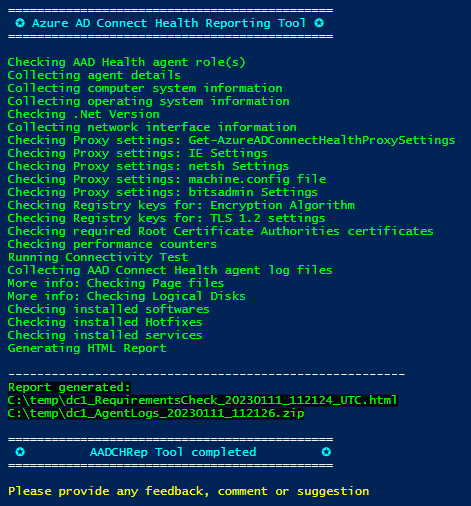
- For a sample generated report check this sample report @
https://github.com/tajaber/AADCHRep/blob/main/ServerName_RequirementsCheck_DATETIME_UTC.html.pdf
1.1 (current)
- Collecting MSInfo
- Collecting more details from registry

1.0
- Initial Version