Candy Crush Game remake - APCS Final for Mr. K's period 10 class.
Group Name: Sweet Treats
Members: Steven Lei and Ava Lu
We will be creating a remake of the Candy Crush Saga game using Java and Processing. The game will offer five levels of increasing difficulty and will incorporate obstacles such as icings. The goal is to clear all of the obstacles with a limited number of moves. The user will also be able to create special combos using striped candies that can clear a row or column. Each map will be manually created with a set candy placement and as the game progresses, random candies will be generated.
Full Documentation: https://docs.google.com/document/d/14Sa5gidgGSbhlf87K5KDiDqQwpsWG7MyiybDuFpHrM4/edit?usp=sharing
Pull from main branch. Run CandyCrushMain.pde in Processing.
To play, press Play on the first screen, which will take you to the levels screen. Although the image displays 10 levels, only levels 1-5 are implemented. Click on any one of these levels to start the gameplay. Once inside the level, you can quit the level by clicking the button on the top left corner.
Our game mimics the way traditional Candy Crush works, but instead of swiping the mouse, you can simply click on Candies to cause swaps. Only neighboring Candies will swap with each other. If at any point he level state is unsolvable (meaning the player can't make a move to trigger a match), the game will randomize the map and spawn new Candies until the map is solveable.
To resume playing, click on the top left button again. Your number of remaining moves and blockers will be displayed at the top, along with the number of points. For each level, you can continue playing until the number of moves runs out, in which case you will be brought to a win or lose screen. Then exit that screen through the same button.
Although we have done numerous bugfixes, if any do occur within a level, such as not all Candies not being displayed, it is best to relaunch the game through Processing.
-
5/24
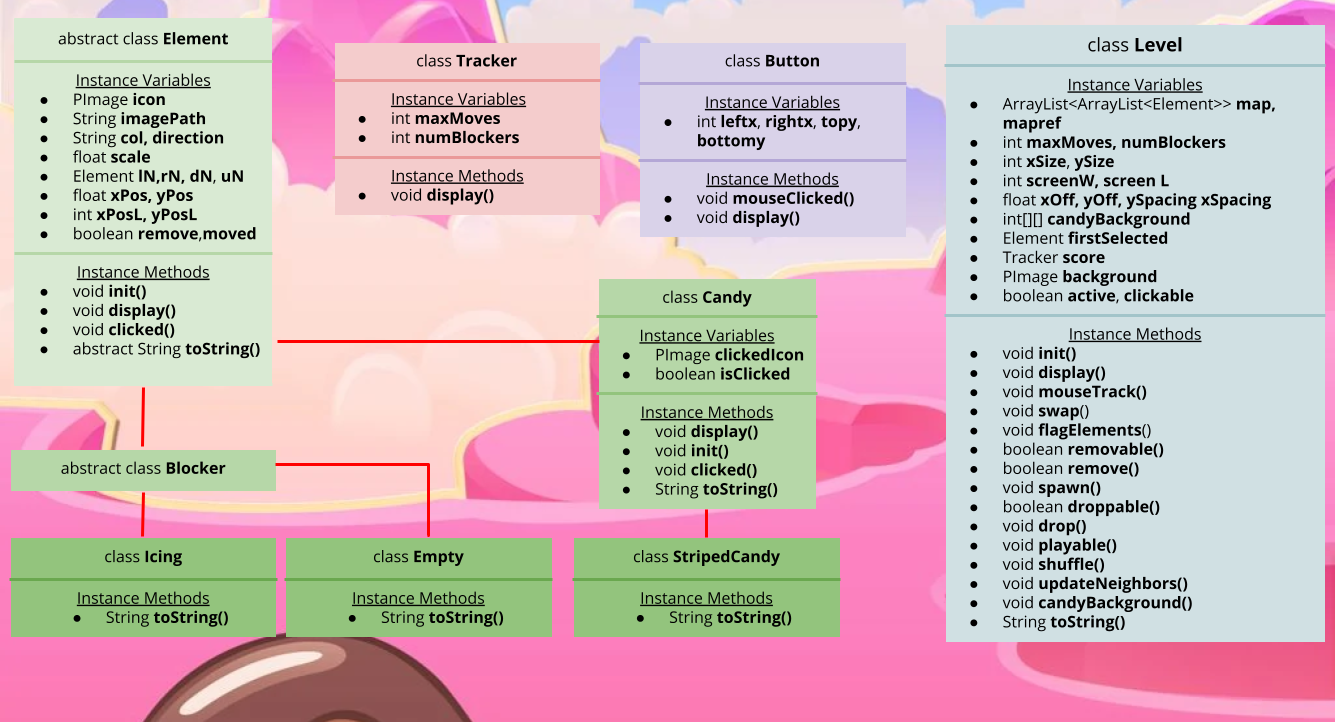
- Together: We created our repo, worked on creating our prototype, and discussed what elements of the game we wanted to include. We also created a basic UML diagram that connected our classes and methods. We set goals for our MVP and nice-to-have features for our final version.
-
5/25
- Steven: I created the group discussion, created template classes and uploaded them to our repo.
- Ava: I joined the group discussion on rocketchat and pulled all of the class templates from our repo during class.
- Together: We discussed how we should specifically implement the Candy, Blocker, and Button classes. We realized that a nice use of OOP would be to make each level object dictated by a .txt file representing the level. This would make it easy for us to design levels since we would just edit a .txt file, and this also opens up the room for custom levels.
-
5/26
- Steven: I implemented the Blocker class and Icing subclass, and tested displaying its icon from an image file in the Processing project data folder.
- Ava: I created text files for Levels 1 and 2 with information about the initial positions of candies and letters representing the different colors. I also implemented the Candy class in a similar faction to the Blocker class and tested displaying various colors, which all worked.
-
5/27
- Steven: I created the mapTesting branch and worked on implementing the level class. To read in our level .txt file, I first tried using Java’s built in Scanner, but I realized that this meant I would need to encapsulate our main in a try-catch block. I did some research and discovered that I could also use Processing’s readString() function, and started working on scanning through that process.
- Ava: I created the buttonDev branch and worked on creating our home screen with the play button and finding the right dimensions for our screen. After that, I added the image of the levels screen as well and started working on implementing the Button class, which connects the different screens.
- Together: We briefly discussed how we could use git branching to divide our work and organize it in a fashionable manner.
-
5/30
- Steven: N/A
- Ava: I created the text files for levels 3 and 4, which included information about the candy placement and also information about the number of rows, columns, and the limited number of moves.
-
5/31
- Steven: First, I reformatted the class hierarchy of the game elements by adding the parent abstract class Element. Candy and Blockers now extend from this class, which removes the repeated constructor scheme for loading the image icon. I also finished the constructor of the level class using loadStrings and String delimiters. I was able to successfully display each Element object within the map 2D ArrayList of the level and also accounted for empty squares.
- Ava: N/A
-
6/1
- Steven: I worked on updating the icons of Candies after realizing that they were the incorrect resolution and tweaked displaying the level object so it would be centered in the screen.
- Ava: I created the button that connected the playButton with the levels screen and adjusted the screen sizes for both PImages.
-
6/3
- Steven: I implemented the abIlity to click on Candies and update their icons if they are clicked. After I was able to do this, I worked on making sure that only one candy can be selected at a time, and the second candy would trigger a swap function. I also made some adjustments to the Level and class to make sure the neighbors of each element are properly set and started the remove method.
- Ava: I created a global String variable that kept track of the screen that is currently being displayed, added the text files for levels 5 and 6, and worked on displaying each level from the levels screen. I also added the class templates for Jelly and StripedCandy. Together: We merged our branches…
-
6/4 (before 8am)
- Steven: I completed the swap and remove method for Candies, added the spawnCandy() and pushDown() methods for making the Candies drop after a removal. I did some debugging to make polish the swap() method, but unfortunately there are some issues that I did not fully resolve.
- Ava: I connected all the buttons to their screens and created a tracker class that displays the number of moves and blockers left. I also implemented the win and loss screen.
-
6/7
- Steven: N/A
- Ava: I started to clean up the buttons by putting the code to check for the mouse coordinates in the Button class instead of in draw().
-
6/8
- Steven: I updated our documentation and moved our UML to google drawings for easier access.
- Ava: I added display() and mouseClicked() methods to my Button class that do different actions depending on what is being displayed.
-
6/10
- Steven: N/A
- Ava: I made the code cleaner for the Level 1 Button, but have not implemented the other buttons or the back buttons yet.
-
6/11
- Steven: I began refactoring our old level class and implemented a new algorithm for removing Candies. Created methods drop(), flagCandies(), spawn(), and remove() to break this process into smaller methods.
- Ava: N/A
-
6/12
- Steven: I updated the Element and Levels class to fix removing candies and tested it on Level1. I also created a new Empty class to update visuals and how everything in a level is displayed.
- Ava: I deleted some methods in Button and added displayLevels() in CandyCrushMain, added more functions in draw to increase the time it takes to transition between screens. I also added the rest of the text files.
-
6/13
- Steven: I implemented the StripedCandy() class after much testing. I also created a pseudo animation for the candies by manipulating the frame rate. I did bug fixing on drop() to account for diagonal Candy drops and started working on playable()
- Ava: I made the buttons more efficient and generally increased readability, fixed text files to replace jellies with icings, and connected all screens with gameplay.
- Together: Merged our branches and fixed minor bugs.
-
6/14
- Steven: I implemented and tested the playable() method, which checks to see if the map can be solved by a player, and if not, the map will get reshuffled with new Candies. I debugged drop() further.
- Ava: I made sure the toggle button was working, added run instructions in README, tested for any bugs. Together: Updated UMLs, documentation, and bug fixes. Merged everything onto main.
UML