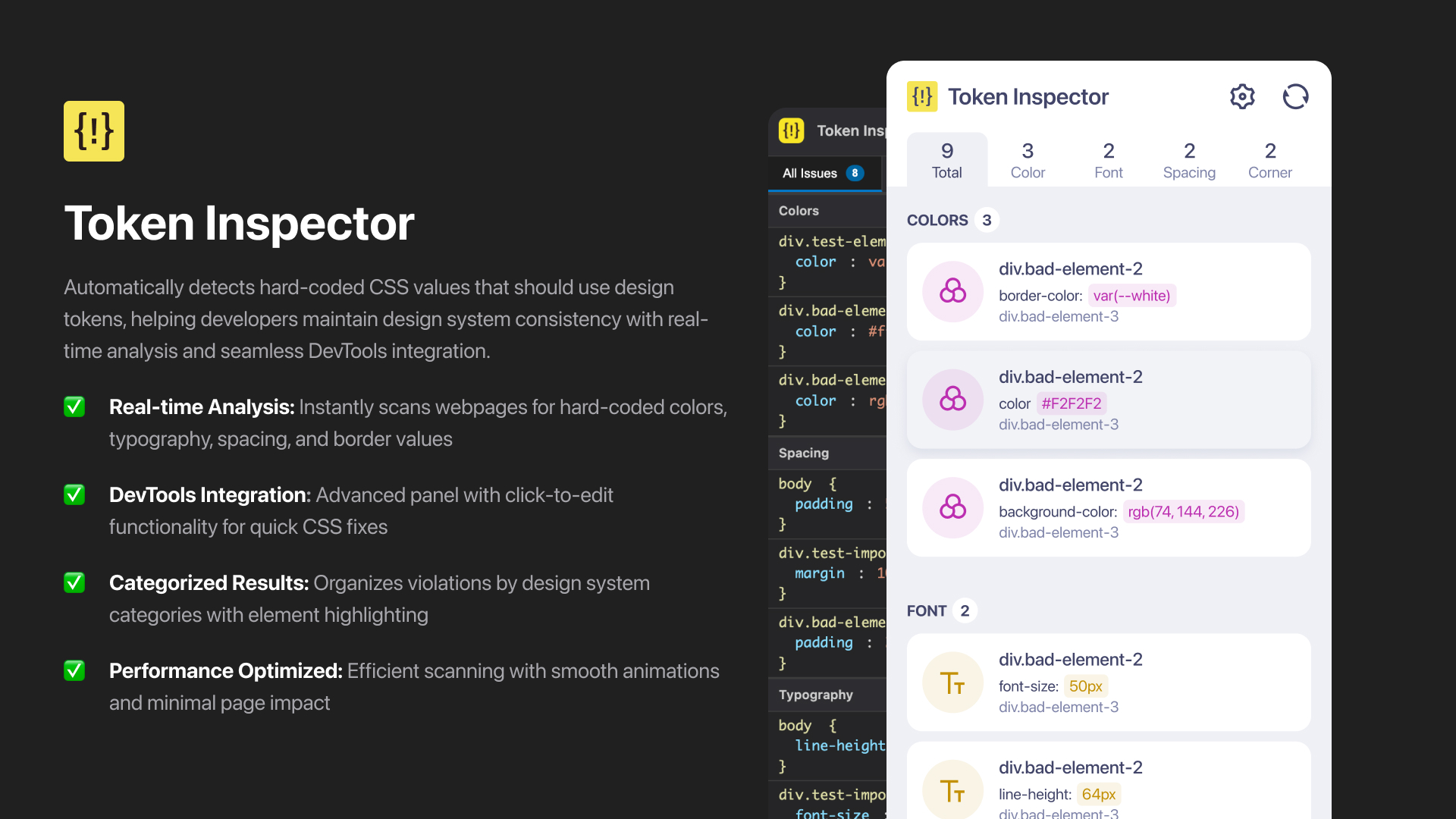
Token Inspector is a Chrome extension designed for developers and designers to inspect and analyze design tokens and hard-coded CSS values on any webpage. It helps ensure design system consistency by identifying violations in real time, with a focus on performance and usability.
- Detects Hard-Coded CSS Values: Instantly scans webpages for hard-coded colors, typography, spacing, and border values that should use design tokens.
- Organized by Category: Groups violations by design system category (Color, Typography, Spacing, Border) for clear review.
- Minimal UI: Clean, easy-to-use interface with tabbed navigation and detailed violation information.
- Chrome DevTools Panel: Integrates directly into DevTools for advanced inspection, element highlighting, and inline CSS editing.
- Consistent Scanning Logic: Uses a shared scanning engine for both popup and DevTools, ensuring reliable results everywhere.
- Performance Focused: Fast, efficient scanning with minimal impact on page performance.
- Comprehensive Test Files: Includes a variety of test pages to verify detection accuracy and edge cases.
- Clone the repository:
git clone https://github.com/srizon/token-inspector.git cd token-inspector - Open Chrome and go to
chrome://extensions/. - Enable "Developer mode" (top right).
- Click "Load unpacked" and select the
token-inspectordirectory. - The extension will appear in your Chrome toolbar.
- Navigate to any webpage you want to analyze.
- Click the Token Inspector icon in your Chrome toolbar.
- The extension scans the page and displays results by category.
- For advanced analysis and editing, open Chrome DevTools and select the "Token Inspector" tab.
- Click on any CSS value in the DevTools panel to edit it inline.
token-inspector/
├── manifest.json              # Extension manifest
├── popup/                     # Popup UI and logic
│   ├── popup.html
│   ├── popup.js
│   ├── popup.css
│   ├── settings.html          # Settings page for managing flagged variables
│   └── settings.js            # Settings page logic and JSON editor
├── content/                   # Content script for page analysis
│   └── content.js
├── shared/                    # Shared scanning logic
│   └── shared-scanner.js
├── panel/                     # DevTools panel UI and logic
│   ├── panel.html
│   ├── panel.js
│   └── panel.css
├── devtools/                  # DevTools integration
│   ├── devtools.html
│   └── devtools.js
├── assets/                    # Category and navigation icons
│   ├── icon-color.svg         # Color category icon
│   ├── icon-text.svg          # Typography category icon
│   ├── icon-spacing.svg       # Spacing category icon
│   ├── icon-border.svg        # Border category icon
│   ├── icon-caret.svg         # Caret icon for navigation
│   ├── icon-scan.svg          # Scan button icon
│   ├── icon-settings.svg      # Settings button icon
│   └── project-cover.jpg      # Project cover image
├── icons/                     # Extension icons
│   ├── icon16.png
│   ├── icon32.png
│   ├── icon48.png
│   └── icon128.png
├── lottie/                    # Lottie animation assets
│   ├── lottie.min.js          # Lottie library
│   └── lottie_scanning.json   # Scanning animation
├── tests/                     # Test files for development
│   ├── simple-test.html       # Basic test scenarios
│   └── complex-test.html      # Complex test scenarios
├── flagged-variables.json     # Custom flagged variables
└── README.md                  # Project documentation
- Colors: Hard-coded color values (hex, rgb, rgba, hsl) as well as user defined flagged-variables.
- Typography: Font sizes, font weights, line heights
- Spacing: Margins, paddings, gaps
- Corner Radius: Border radius values
tests/simple-test.html: Basic test cases for common violationstests/complex-test.html: Complex scenarios with nested elements and inline editing functionality
Token Inspector is built for speed and efficiency:
- Caches CSS rules and selectors to reduce redundant work
- Skips irrelevant elements early for faster scanning
- Uses optimized logic to identify violations quickly
- Maintains a low memory footprint and non-blocking UI updates
- Bug Fix: Fixed cancel button in settings page not working - now properly navigates back to popup interface.
- UI Improvement: Cancel button is now always enabled, allowing users to return to popup regardless of unsaved changes state.
- Settings Interface: Added comprehensive settings page with JSON editor for managing flagged variables.
- Variable Management: Users can now view, edit, save, download, and upload flagged variables through an intuitive interface.
- JSON Editor Features: Syntax highlighting, line numbers, validation, auto-formatting, and error handling for flagged variables editing.
- Chrome Storage Integration: Flagged variables are now stored in Chrome's local storage for persistence across sessions.
- UI Enhancements: Added settings and scan icons to header, improved navigation between popup and settings pages.
- File Operations: Download and upload functionality for flagged variables JSON files with validation.
- CSS Value Extraction: Fixed regex to prevent capturing closing braces
}in property values, improving accuracy and eliminating false positives.
- Lottie Animation: Integrated smooth Lottie animations for scanning, replacing the static spinner.
- Extension Icons: Refreshed all icon sizes for visual consistency.
- Loading & Error Handling: Improved loading animation with CSS spinner fallback and graceful error handling for animation loading.
- Manifest & Performance: Added Lottie assets to web_accessible_resources and optimized animation management for efficiency.
- !important Detection: Scanner now properly flags and handles CSS values with
!importantby stripping the keyword before analysis. - Test Coverage: Added test cases in
simple-test.htmlfor!importanthandling. - Backward Compatibility: All existing functionality preserved.
- Highlighting: Switched to overlay-based highlighting to prevent layout disruption and unified behavior across popup and DevTools.
- Event Handling: Improved click outside detection and event listener cleanup to avoid memory leaks.
- Border Radius & Style Restoration: Overlays match target border radius and restore styles only when necessary.
- Inline CSS Editing: Edit CSS values inline in DevTools with real-time validation, direct application, and visual feedback.
- Element Selection: More robust element finding with multiple fallback methods.
- UI & Validation: Minimal editing interface, keyboard shortcuts, and property-specific validation.
- Project Reorganization: Restructured codebase into organized folders (
popup/,content/,devtools/,panel/,shared/,tests/). - Documentation: Updated gitignore and project structure docs.
- UI & Styling: Improved summary, highlighted states, spacing, and overall visual consistency.
- Test Files: Enhanced for consistency.
- Breadcrumbs & Navigation: Enhanced breadcrumb formatting, category ordering, and added caret icon.
- Performance & UI: Faster scanning, UI refinements, and code cleanup.
- UI Redesign: Minimal, modern look with category-specific SVG icons, modular CSS, and better accessibility.
- Performance: Optimizations and improved asset management.
- Visual Hierarchy & Accessibility: Improved summary view, icons, keyboard navigation, and mobile responsiveness.
- Test Organization: Modular CSS and better test file structure.
- Highlighting & Feedback: Pulse animations for highlighting, improved user experience, and code cleanup.
- Flagged Variables & Tooltips: Support for flagged CSS custom properties, enhanced tooltips, comprehensive test files, and better error handling.
- Cleanup & Documentation: Code cleanup, streamlined structure, updated docs, and improved error handling and UI.
Token Inspector – Helping teams build consistent, token-driven designs.