Skip to content

Conversation

@nicolethoen
Copy link
Contributor

@nicolethoen nicolethoen commented Apr 22, 2019

Addresses Issue 1288

Screen Shot 2019-04-23 at 10 59 24 AM
Screen Shot 2019-04-23 at 10 59 44 AM

@codecov-io
Copy link

codecov-io commented Apr 22, 2019

Codecov Report

Merging #1814 into master will increase coverage by 0.07%.
The diff coverage is 80.48%.

Impacted file tree graph

@@            Coverage Diff             @@
##           master    #1814      +/-   ##
==========================================
+ Coverage   82.65%   82.73%   +0.07%     
==========================================
  Files         614      612       -2     
  Lines        6780     6724      -56     
  Branches       93       76      -17     
==========================================
- Hits         5604     5563      -41     
+ Misses       1136     1131       -5     
+ Partials       40       30      -10
Flag Coverage Δ
#patternfly3 84.87% <ø> (ø) ⬆️
#patternfly4 79.47% <80.48%> (+0.12%) ⬆️
#patternflymisc 95.68% <ø> (ø) ⬆️
Impacted Files Coverage Δ
...y-4/react-core/src/components/Dropdown/Dropdown.js 95.65% <ø> (ø) ⬆️
...react-core/src/components/Pagination/Pagination.js 100% <ø> (ø) ⬆️
...src/components/OptionsMenu/OptionsMenuSeparator.js 100% <100%> (ø)
...src/components/OptionsMenu/optionsMenuConstants.js 100% <100%> (ø)
...t-core/src/components/Pagination/ToggleTemplate.js 100% <100%> (ø) ⬆️
.../components/OptionsMenu/OptionsMenuToggleButton.js 100% <100%> (ø)
...src/components/OptionsMenu/OptionsMenuItemGroup.js 100% <100%> (ø)
...src/components/Pagination/PaginationOptionsMenu.js 92.3% <100%> (ø)
...act-core/src/components/OptionsMenu/OptionsMenu.js 100% <100%> (ø)
...core/src/components/OptionsMenu/OptionsMenuItem.js 42.85% <42.85%> (ø)
... and 46 more

Continue to review full report at Codecov.

Legend - Click here to learn more
Δ = absolute <relative> (impact), ø = not affected, ? = missing data
Powered by Codecov. Last update 9d66833...0acef8c. Read the comment docs.

@patternfly-build
Copy link
Collaborator

PatternFly-React preview: https://1814-pr-patternfly-react-patternfly.surge.sh

@redallen
Copy link
Contributor

You just had some importing errors. I fixed them for you!

@nicolethoen nicolethoen changed the title Feat(Options Menu): Add Options Menu Component (Work in Progress) Feat(Options Menu): Add Options Menu Component Apr 22, 2019
Copy link
Member

@mcarrano mcarrano left a comment

Choose a reason for hiding this comment

The reason will be displayed to describe this comment to others. Learn more.

I see a couple of issues/questions:

  • The first example (single option) is not quite what I expected. This component would generally be used to select one option from among a list, sort options or items per page, for example. It's not the same as a multi-select. Can we change this to just be single-select? In that case the behavior will be the same as the second example, but with only one option-group.

  • In the second example, I'm noticing that the horizontal spacer between menus if different from the core example. Also that the width groups when I select the last item. Can the menu be sized so it will fit the width of all items without needing to grow/shrink to fit?

  • For the "Plain" example, not sure we need the text label. The Core example only has an icon. I guess you could use both, but it's not typical. In most cases a custom icon would be used in place of a label where we want to sane space.

@nicolethoen
Copy link
Contributor Author

@mcarrano

I see a couple of issues/questions:

  • The first example (single option) is not quite what I expected. This component would generally be used to select one option from among a list, sort options or items per page, for example. It's not the same as a multi-select. Can we change this to just be single-select? In that case the behavior will be the same as the second example, but with only one option-group.

Should be no problem! :)

  • In the second example, I'm noticing that the horizontal spacer between menus if different from the core example. Also that the width groups when I select the last item. Can the menu be sized so it will fit the width of all items without needing to grow/shrink to fit?

I did see that issue - and I think that'd be a change we'd need to make in core (since I don't think we want to introduce css in the react component. I have the change locally, so I can open a PR for the change to core.

  • For the "Plain" example, not sure we need the text label. The Core example only has an icon. I guess you could use both, but it's not typical. In most cases a custom icon would be used in place of a label where we want to sane space.

no problem :)

@nicolethoen
Copy link
Contributor Author

@mcarrano

  • For the "Plain" example, not sure we need the text label. The Core example only has an icon. I guess you could use both, but it's not typical. In most cases a custom icon would be used in place of a label where we want to sane space.

no problem :)

Actually, the plain example is only an icon. It's the third example on the page. The last example on the page is a plain with text the same way it is in the core examples to demonstrate how someone can make their own custom toggle button using the pf-m-text modifier. Did I misunderstand some of the applications?

@mcoker
Copy link
Contributor

mcoker commented Apr 22, 2019

thanks @nicolethoen!!

  • In the "Options Menu - Plain" example, the toggle button should be <button class="pf-c-options-menu__toggle pf-m-plain">.

  • In the "Options Menu - Plain with text" example, the toggle button should be <button class="pf-c-options-menu__toggle-button"> (like you have it already).

  • In the rest of the examples, the toggle button should be <button class="pf-c-options-menu__toggle">

After those updates, you should notice the toggles will be shorter to match the height of the "Options Menu - Plain with text" example, and the icon in the "Options Menu - Plain" example will be a lighter shade of grey when not expanded.

  • On the "Options Menu - Plain" example, the <button> needs an aria-label, and the aria-labelledby.

  • On all of the examples, the ID's referenced in aria-labelledby on the toggle button need to be reversed, so that the "[example name]-label" ID is listed first and the "[example name]-toggle" ID is listed last.

  • In the "Options Menu - Multiple options" example with groups, the separator <li> is nested inside of another <li>. That's invalid HTML (a <li> can only be a child of <ol> or <ul>). Can you just move the separator <li> up to be a direct descendent of ul.pf-c-options-menu__menu?

  • In the "Options Menu - Multiple options" example, we have an aria-label on the nested <ul>'s for this style menu in core. @jgiardino do you think we should add those to the example here?

  • In the examples except for plain and plain with text, you have an unnecessary <span> nested inside of <span class="pf-c-options-menu__toggle-text">

  • In the plain example, remove the <span class="pf-c-options-menu__toggle-text"> so the icon is a child of the <button>. Also the icon should probably be an <svg> (I'm assuming using react-icons?) instead of an <i>. You can look at the dropdown component as an example for how to handle that.

  • In the plain with text example, add .pf-c-options-menu__toggle-text to the <span> that wraps the text.

@mcarrano if you look at the "Options Menu - Multiple options" example, and select "ascending", then select "descending", the menu width changes. You can also expand the "Options Menu - Plain" example, and click an item multiple times to select/unselect it, and the same thing happens. Should we address that somehow, or would you expect that?

@nicolethoen
Copy link
Contributor Author

nicolethoen commented Apr 23, 2019

Okay, I've been addressing comments so far. I wanted to update so comments don't get duplicated.

still left to do (as far as I'm aware):

  • fix arrow up and arrow down keyboard controls on the menu
  • address issue of checkmarks being removed when unselected rather than hidden - resulting in width of menu changing at times.
  • possibly adding aria-labels to ul groups in menu

@mcoker
Copy link
Contributor

mcoker commented Apr 23, 2019

address issue of checkmarks being removed when unselected rather than hidden - resulting in width of menu changing at times.

Let me know if you need help with this. FWIW, the checkmarks are absolutely positioned, so even if they're in the list (and not visible), they technically don't take up/create any space. The class .pf-m-selected is what creates space for the checkmarks. One way you could do it is to add .pf-m-selected to all of the list items, then add and remove the checkmark from the list when an item is selected. However I wouldn't want to add .pf-m-selected to an item that isn't selected - in that case, I would prefer handle this in core and just create space for the checkmark in all of the menu items, then you can just add/remove the checkmark when an item is selected.

@jgiardino
Copy link
Contributor

Hey, great job on this @nicolethoen!

In the "Options Menu - Multiple options" example, we have an aria-label on the nested

    's for this style menu in core. @jgiardino do you think we should add those to the example here?

Yes. In this case, having a prop named aria-label on the component OptionsMenuItemGroup would be consistent with how we want to handle aria attributes going forward.

Some other comments about labels and such:

  • I saw that you mentioned handling arrow key interaction in a comment above. I'd expect all keyboard interaction to be consistent with how we handle it in the Dropdown component. This includes other keys, like Tab and Esc (and Enter might or might not be handled automatically via onClick events). Let me know if you need specific guidance on this. @kmcfaul would also be a good contact for suggestions on how to handle this.

  • As for handling aria-label and aria-labelledby on the OptionsMenuToggleButton component, we should not have these automatically defined for this component. We should allow the consumer to specify these like props on that component, and then pass them to the <button class="pf-c-options-menu__toggle"> element. And then to illustrate best practice, we should include aria-label="Sort by" on OptionsMenuToggleButton in the third example (i.e. the example with the icon).

  • I realize that there are <span hidden> elements in the Core examples, but we shouldn't build these into the component. If we include them, the way I recommend handling them is how they are in the Select component (except for what's noted in Select isGrouped - remove aria-label from example #1738)—i.e. part of the example, but not part of the component. But really, I think we can remove them from these examples. Whether or not these are needed are really dependent on context and might be something we would include in our demos. But out of context of a demo, I think they are potentially confusing to consumers. BTW, I opened this for core: Options menu hidden label patternfly#1758

    • Since the menus are currently referencing the hidden label in aria-labelledby (e.g. <ul class="pf-c-options-menu__menu" aria-labelledby="options-menu-multiple-options-example-label">), we should instead use the id defined on the toggle (e.g. aria-labelledby="options-menu-multiple-options-example-toggle"). We should also allow consumers to specify aria-label on the ul.pf-c-options-menu__menu element. Since this element doesn't exist as a component, then I recommend handling this attribute with a prop named ariaLabelMenu on the OptionsMenu component. And if this prop is defined, then the aria-labelledby that we automatically include should no longer be included.
  • Something I noticed is that other similar components like Select and Dropdown do not include the menu in the DOM with hidden and instead only load the menu in the DOM when the user chooses to display it. I have no opinion on this behavior, but just wanted to note the inconsistency in case that was not intentional.

@nicolethoen
Copy link
Contributor Author

nicolethoen commented Apr 24, 2019

@jgiardino

  • I saw that you mentioned handling arrow key interaction in a comment above. I'd expect all keyboard interaction to be consistent with how we handle it in the Dropdown component. This includes other keys, like Tab and Esc (and Enter might or might not be handled automatically via onClick events). Let me know if you need specific guidance on this. @kmcfaul would also be a good contact for suggestions on how to handle this.

I have already accounted for at tab and enter, but I will also look at esc.

  • As for handling aria-label and aria-labelledby on the OptionsMenuToggleButton component, we should not have these automatically defined for this component. We should allow the consumer to specify these like props on that component, and then pass them to the element. And then to illustrate best practice, we should include aria-label="Sort by" on OptionsMenuToggleButton in the third example (i.e. the example with the icon).

By this, do you mean that we should NEVER have an automatically defined aria-label or aria-labelledby on the OptionsMenuToggleButton component, and only allow the consumer to pass an ariaLabel as a prop to the OptionsMenuToggleButton component? My understanding would be that the aria-label should be used on the OptionsMenuToggleButton whenever the button has no text and only icons.

@jgiardino
Copy link
Contributor

Recapping what we discussed in person...

For the examples labeled Options Menu - Plain and Options Menu - Plain with text (i.e. examples where the toggle button has an icon instead of text label), we will provide a default aria-label value of "Options menu". But in the Options Menu - Plain example, we will customize that text to say "Sort by" (i.e. Options Menu - Plain with text will not have aria-label defined in the example and therefore use the default value).

For the example labeled Options Menu - Plain with text, we will change the text before the toggle to "Custom text"

@nicolethoen
Copy link
Contributor Author

Okay, I think I have addressed all PR comments made so far.

a few notes:

  • I think adding the key handling for up, down, and escape should be moved into an issue so that this PR can be merged today or tomorrow. It will take too long and I don't think it is necessary to complete for this week.

  • I also have been having issues with moving the CheckIcon out of the icon tag on the OptionsMenuItem component. I'm not sure why it isn't working, but I think it's something that should also be moved out to a separate issue to be figured out after this release, since it currently works as is.

  • When you load the examples, there is a warning printed into the console about encountering two children with the same key when building the docs. It doesn't seem to be resulting in any issues on the page, but I'm not sure what that's about. @redallen do you have any ideas what could be causing that?

mcarrano
mcarrano previously approved these changes Apr 25, 2019
Copy link
Member

@mcarrano mcarrano left a comment

Choose a reason for hiding this comment

The reason will be displayed to describe this comment to others. Learn more.

This is looking much better @nicolethoen . I'm still not happy about the "shimmy" effect when you select/deselect items, but the overall functionality looks right now. Agree that we can handle remaining issues as bugs to be fixed later.

@jgiardino
Copy link
Contributor

jgiardino commented Apr 25, 2019

These are a couple of things that I noticed that should be fixed:

  • The button toggles that display icons instead of text should have aria-label with a default value of "Options menu". The consumer should be able to provide their own text string by adding aria-label="..." to the toggle component. The following are some updates needed for this:

    • In the example Options menu - Plain
      • The example should have aria-label="Sort by" defined on <OptionsMenuToggle>
        • Currently, you support this with a prop named ariaLabel. As part of fix(aria): make aria-* component props consistent #1731, we worked on standardizing prop names related to aria-label/labelledby attributes. If the component has several elements that could be labeled, then we name the prop something like ariaLabelMenu. But if the component only has one thing that can be labeled, then we just use aria-label. Can you update the prop name for this case to aria-label?
      • The button toggle currently has these attributes:
        <button class="pf-c-options-menu__toggle pf-m-plain" id="options-menu-plain-example-toggle" aria-haspopup="listbox" aria-label="" aria-expanded="true">
        • The issue is that aria-label has an empty value. Instead, if aria-label isn't specified on <OptionsMenuToggle> then it should default to "Options menu". But if it is specified, it should display the value specified.
    • In the example Options menu - Plain with text
      • Similar to previous comments, can we change the prop name ariaLabel for <OptionsMenuToggleWithText> to be aria-label instead?
      • The button toggle currently has these attributes:
        <button class="pf-c-options-menu__toggle-button" id="options-menu-plain-with-text-example-toggle" aria-haspopup="listbox" aria-label="" aria-labelledby="options-menu-plain-with-text-example-toggle" aria-expanded="false">
        • One issue is that aria-label has an empty value. Instead, the default value "Options menu" should be set as the value.
        • Another issue is that aria-labelledby is defined, but it shouldn't be included here.
        • NOTE: in this example, we will just use the default value for aria-label and not specify a value on <OptionsMenuToggleWithText>
  • The menu .pf-c-options-menu__menu by default should include aria-labelledby with a value that is equal to the id defined for the button toggle. The consumer should be able to provide their own text string by adding ariaLabelMenu to the OptionsMenu component. The following are some updates needed for this:

    • In the example Options menu - Plain, the menu currently displays like this:
      <ul class="pf-c-options-menu__menu" aria-labelledby="options-menu-plain-example-toggle" aria-label="Sort by">
      • Since ariaLabelMenu="Sort by" is defined on <OptionsMenu>, then aria-labelledby should be removed. Otherwise, this attribute will overwrite what is defined in the prop.
    • In the same example, when I remove the prop ariaLabelMenu, then the menu has these attributes:
      <ul class="pf-c-options-menu__menu" aria-labelledby="true" aria-label="">
      • aria-label shouldn't be included
      • aria-labelledby is now set to true, but the way it's defined in the previous example is what I expect in this case: aria-labelledby="options-menu-plain-example-toggle"
    • NOTE: the behavior described above is expected for all instances of the Options menu, not just in the example I referenced.
  • The prop ariaLabelMenu works and is labeled as expected, but the description is slightly inaccurate. Can you change this to:

    Provides an accessible name for the Options menu

    i.e. remove the part that says "...when an icon is used instead of text"

@nicolethoen
Copy link
Contributor Author

@jgiardino Let me know if I misunderstood any of the above comments. I believe I've addressed them now :)

@mcoker
Copy link
Contributor

mcoker commented Apr 25, 2019

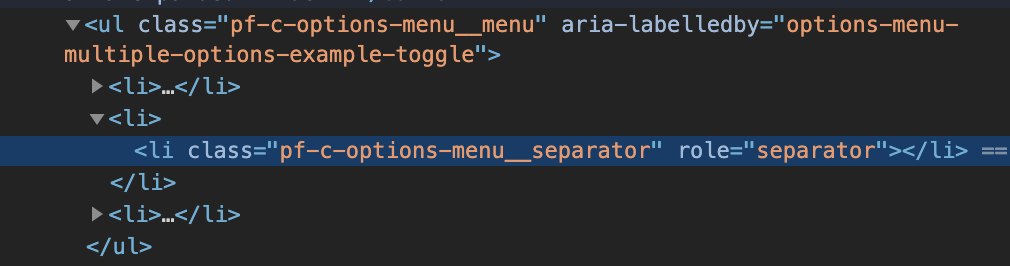
Can we update the <li> that is used as a separator in the menu with groups?

In the "Options Menu - Multiple options" example with groups, the separator <li> is nested inside of another <li>. That's invalid HTML (a <li> can only be a child of <ol> or <ul>). Can you just move the separator <li> up to be a direct descendent of ul.pf-c-options-menu__menu?

Currently this:
Screen Shot 2019-04-25 at 1 07 25 PM

Should be this:
Screen Shot 2019-04-25 at 1 07 38 PM

dlabaj
dlabaj previously approved these changes Apr 25, 2019
Copy link
Contributor

@dlabaj dlabaj left a comment

Choose a reason for hiding this comment

The reason will be displayed to describe this comment to others. Learn more.

LGTM

@jgiardino
Copy link
Contributor

Your updates are great! All the props work as expected!

I just noted below a couple of minor refinements, like changes to default text strings and what props we define on the examples.

  • In the example Options menu - Plain, there are a couple of changes to make to the props we have defined (not changes to how the props work in the component)
    • It should have aria-label="Sort by" defined on <OptionsMenuToggle>, so this part of the example would look like this:
      const toggle = <OptionsMenuToggle onToggle={this.onToggle} toggleTemplate={this.toggleTemplate} hideCaret aria-label="Sort by"/>
    • It should not have ariaLabelMenu="Sort by" defined on <OptionsMenu>.
  • In the component <OptionsMenuToggle>, the default aria-label text string "Options Menu" should be sentence-style capitalization: "Options menu"

tlabaj
tlabaj previously requested changes Apr 25, 2019
/** Content to be rendered in the Options menu toggle button */
toggleTemplate: PropTypes.oneOfType([PropTypes.string, PropTypes.func]),
/** Props to be passed to the Options menu toggle button template */
templateProps: PropTypes.object,
Copy link
Contributor

@tlabaj tlabaj Apr 25, 2019

Choose a reason for hiding this comment

The reason will be displayed to describe this comment to others. Learn more.

Small nit. Can we call this toggleTemplateProps so the name is more meaningful. Up to you if you want to chnage it or not.

@tlabaj tlabaj dismissed their stale review April 25, 2019 20:53

changing to comment since it it optional change.

@nicolethoen
Copy link
Contributor Author

@tlabaj should be all set!

Copy link
Contributor

@tlabaj tlabaj left a comment

Choose a reason for hiding this comment

The reason will be displayed to describe this comment to others. Learn more.

LGTM

@dlabaj dlabaj merged commit 4f50630 into patternfly:master Apr 26, 2019
Copy link
Contributor

@tlabaj tlabaj left a comment

Choose a reason for hiding this comment

The reason will be displayed to describe this comment to others. Learn more.

LGTM

@nicolethoen nicolethoen deleted the options_menu branch February 8, 2023 13:46
Sign up for free to join this conversation on GitHub. Already have an account? Sign in to comment

Labels

None yet

Projects

None yet

Development

Successfully merging this pull request may close these issues.