The Aikido Safe Chain prevents developers from installing malware on their workstations through npm, npx, yarn, pnpm and pnpx. It's free to use and does not require any token.
The Aikido Safe Chain wraps around the npm cli, npx, yarn, pnpm, and pnpx to provide extra checks before installing new packages. This tool will detect when a package contains malware and prompt you to exit, preventing npm, npx, yarn, pnpm or pnpx from downloading or running the malware.
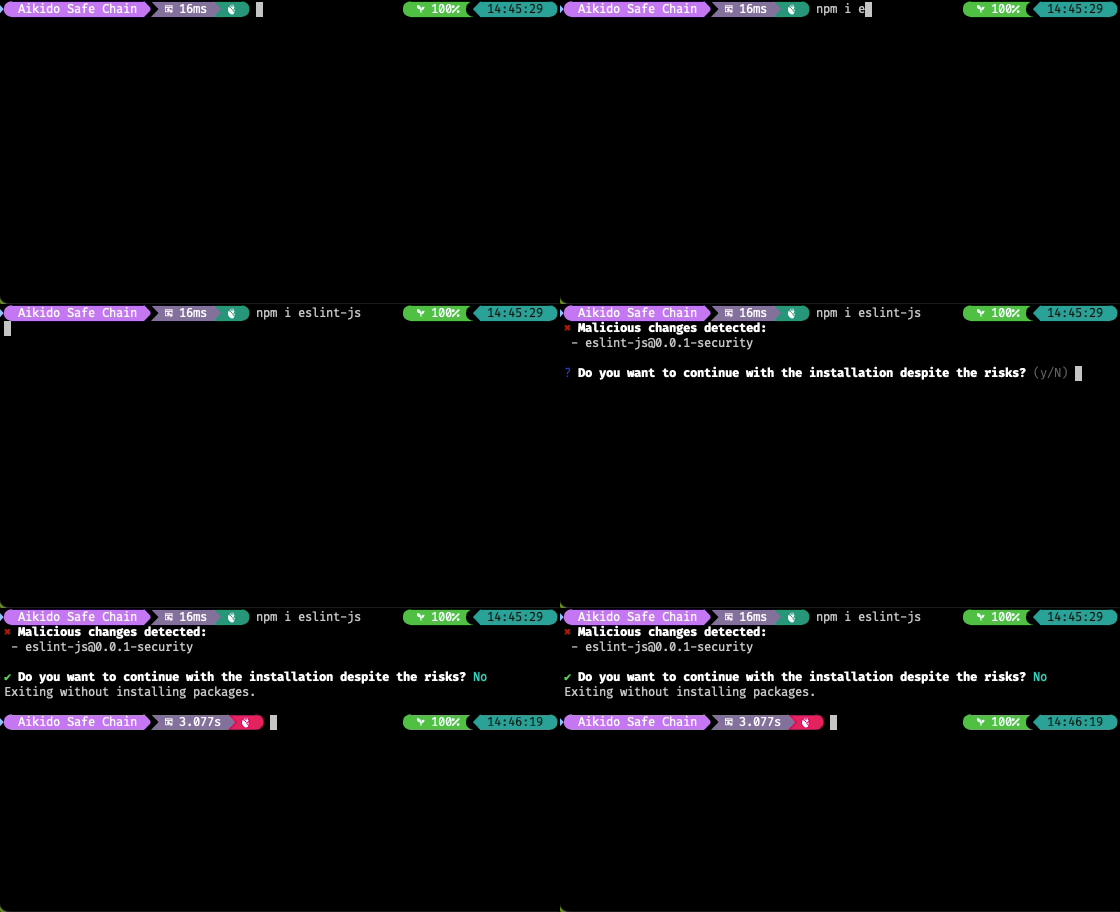
Aikido Safe Chain works on Node.js version 18 and above and supports the following package managers:
- ✅ npm
- ✅ npx
- ✅ yarn
- ✅ pnpm
- ✅ pnpx
- 🚧 bun Coming soon
Installing the Aikido Safe Chain is easy. You just need 3 simple steps:
- Install the Aikido Safe Chain package globally using npm:
npm install -g @aikidosec/safe-chain
- Setup the shell integration by running:
safe-chain setup
- ❗Restart your terminal to start using the Aikido Safe Chain.
- This step is crucial as it ensures that the shell aliases for npm, npx, yarn, pnpm and pnpx are loaded correctly. If you do not restart your terminal, the aliases will not be available.
- Verify the installation by running:
npm install safe-chain-test
- The output should show that Aikido Safe Chain is blocking the installation of this package as it is flagged as malware.
When running npm, npx, yarn, pnpm or pnpx commands, the Aikido Safe Chain will automatically check for malware in the packages you are trying to install. If any malware is detected, it will prompt you to exit the command.
The Aikido Safe Chain works by intercepting the npm, npx, yarn, pnpm and pnpx commands and verifying the packages against Aikido Intel - Open Sources Threat Intelligence.
The Aikido Safe Chain integrates with your shell to provide a seamless experience when using npm, npx, yarn, pnpm and pnpx commands. It sets up aliases for these commands so that they are wrapped by the Aikido Safe Chain commands, which perform malware checks before executing the original commands. We currently support:
- ✅ Bash
- ✅ Zsh
- ✅ Fish
- ✅ PowerShell
- ✅ PowerShell Core
More information about the shell integration can be found in the shell integration documentation.
To uninstall the Aikido Safe Chain, you can run the following command:
- Remove all aliases from your shell by running:
safe-chain teardown
- Uninstall the Aikido Safe Chain package using npm:
npm uninstall -g @aikidosec/safe-chain
- ❗Restart your terminal to remove the aliases.
You can control how Aikido Safe Chain responds when malware is detected using the --safe-chain-malware-action flag:
--safe-chain-malware-action=block(default) - Automatically blocks installation and exits with an error when malware is detected--safe-chain-malware-action=prompt- Prompts the user to decide whether to continue despite the malware detection
Example usage:
npm install suspicious-package --safe-chain-malware-action=promptLearn more about Safe Chain CI/CD integration in the Aikido docs.