AetherOnePy is a Web-based Desktop Application, which means the application runs on your computer but uses a web browser as its interface. You can run it on a Raspberry Pi or a PC (Windows, Linux or Mac).
Digital radionics is based on The RetroPsychoKinesis Project which used radioactive decay (Americanum, from smoke detectors) as a source for true random numbers (TRNG). Therefore the name "hotbits" used a lot in the AetherOne series. Later the quantum tunneling effect of zener diodes substituted the dangerous radioactive method.
- Python version 3.10.x or bigger
- Git
Whatch the video for a quick overview of the installation process.
A dedicated script only for Raspberry Pi. The script does the following:
- Check if the git repository exists
- If the repository exists, navigate to it and pull the latest changes
- else it clones the repository
- It runs the setup.py for downloading the python dependencies
- Finally it runs main.py
So you have an automatic update every time you start the application. If you don't wish to automatically update it, just run the main.py by yourself.
# download the run_aetherone.sh script
wget https://raw.githubusercontent.com/isuretpolos/AetherOnePy/refs/heads/main/py/scripts/run_aetherone.sh
# make it executable with chmod
chmod +x run_aetherone.sh
# run it once for installation and afterwards for every start
./run_aetherone.shThis is a python version of the script, which runs on every operating systems with python 3 installed.
- Install Python, from https://python.org/downloads/, Version 3.12.x
- Install Git, from https://git-scm.com, latest version is fine
- Create a folder for your AetherOnePy somewhere on you computer
- Open a shell there and type:
# download the run_aetherone.py script
curl https://raw.githubusercontent.com/isuretpolos/AetherOnePy/refs/heads/main/py/scripts/run_aetherone.py > run_aetherone.py
# run it once for installation and afterwards for every start
python run_aetherone.py
# some installation requires you to run python3 instead of python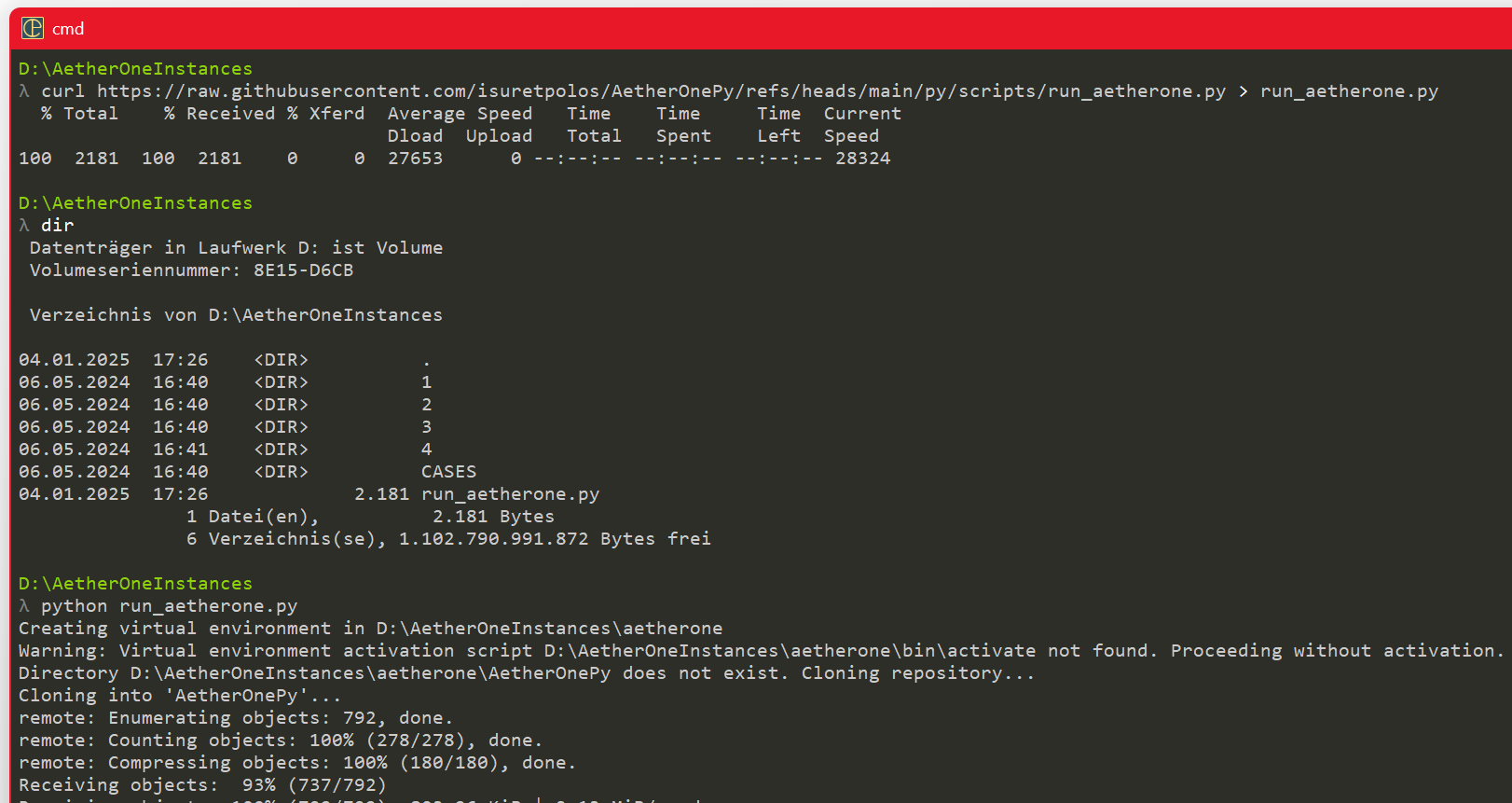
Some systems don't allow a port below 1024, like for example Windows WSL subsystem (ubuntu). In this case use a different port:
python main.py --port 7000Just restart the run_aetherone.sh or run_aetherone.py script. It will update the application every time.
Some notes for users installing the application on the Raspberry Pi.
- Raspberry Pi 5 needs extra cable for the Camera. For example the older ones has a broader cable, the new a slim one. Search for a camera cable extension.
- Installation is a little bit more complex than on a Windows PC, but I will write a script taking care of the installation process
- 2025-07-25 Social Api update (thanks to @emolionl, broadcasting wrong rate fixed, websocket bugfixing wip
- 2025-05-01 OpenAI API + Copy Result into Clipboard for manual analysis
- 2025-03-28 Show historical session details
- 2025-02-07 Broadcast of Hashed Signatures
- 2025-01-04 Session handling and Analysis works
- 2024-12-04 SQLlite Database Design
- 2024-05-28 automatic dependency install
- ReactFlow evaluate
- Element Periodic Table as main analysis and then Schuessle Salts, Minerals, Bacteria, Plants, Fungi, Animals and Imponderabilia, in a specific order, with links to the materia medica (textbooks), with additional description of rows and columns and kingdoms, miasma and so on, which also helps to learn homeopathy
- relate the clinical symptoms (Clarke Materia Medica) to the remedy and display it in a way the user immediately recognize the pattern (without having deeper knowledge of homeopathy)
- Open API for connecting different devices (radionics protocol)
- https://github.com/Bowserinator/Periodic-Table-JSON/blob/master/PeriodicTableJSON.json
- https://modelviewer.dev/
- https://neumorphism.io/#e0e0e0
- https://uiverse.io/
- https://threejs.org/
For advanced users, here are some helpful commands for the terminal.
sudo apt update
# upgrading RPy on regular basis is necessary, especially for git (which could lead to problems)
sudo apt upgrade
# install pip for package management for python libraries
sudo apt-get install python3-pip
# install vim for easier editing scripts
sudo apt install vim
# now you can edit the hidden file .bashrc and set the alias
vim .bashrc
# now enable the alias for ll (like DIR in Windows)
alias ll='ls -la'