
┌──────────────────────── [ R E L E A S E   I N F O ] ──────────────────────────┐
│                                                                               │
│  NAME................................................gitcloakd                │
│  TYPE.......................................GPG Encryption for Git Repos      │
│  VERSION........................................................v1.0.10       │
│  PLATFORM............................................Python 3.9+ / Cross-OS   │
│  CATEGORY..............................................Security / Encryption  │
│  ENCRYPTION MODES........................................................3x   │
│                                                                               │
│  Hide ya repos. Hide ya code. They out here hacking everybody.                │
│                                                                               │
│  [*] SELECTIVE - Encrypt specific files (.env, keys, secrets)                 │
│  [*] FULL - Encrypt entire codebase into single blob                          │
│  [*] DARK - Encrypt EVERYTHING including git history + UUID repo name         │
│                                                                               │
└───────────────────────────────────────────────────────────────────────────────┘




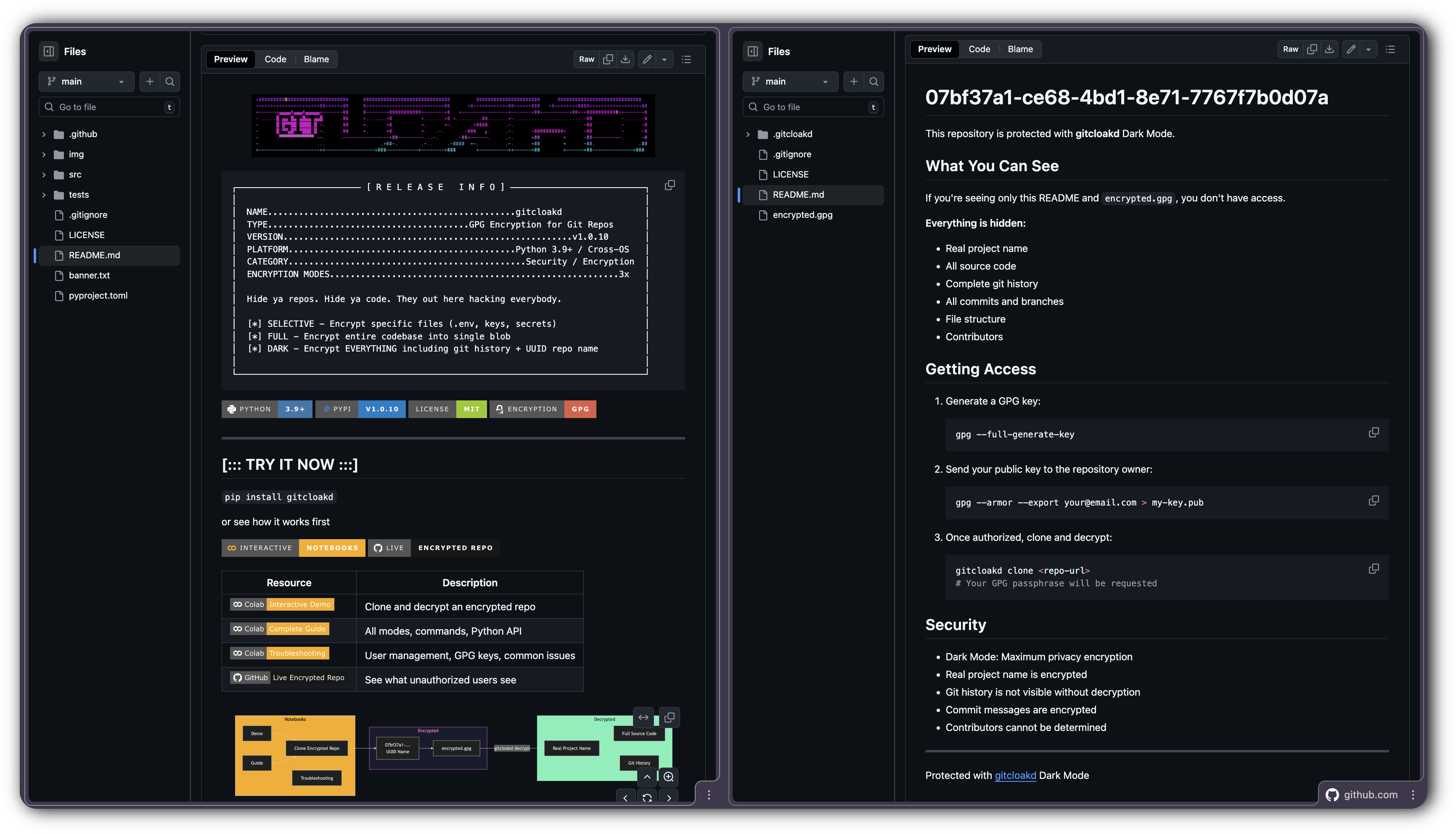
pip install gitcloakd
or see how it works first


| Resource | Description |
|---|---|
 |
Clone and decrypt an encrypted repo |
 |
All modes, commands, Python API |
 |
User management, GPG keys, common issues |
 |
See what unauthorized users see |
graph LR
    subgraph Notebooks
        A[Demo] --> D[Clone Encrypted Repo]
        B[Guide] --> D
        C[Troubleshooting]
    end

    subgraph Encrypted
        D --> E[07bf37a1-...<br/>UUID Name]
        E --> F[encrypted.gpg]
    end

    subgraph Decrypted
        F -->|gitcloakd decrypt| G[Real Project Name]
        G --> H[Full Source Code]
        G --> I[Git History]
    end

    style Notebooks fill:#F9AB00,stroke:#fff,color:#000
    style Encrypted fill:#1a1a2e,stroke:#ff7edb,color:#ff7edb
    style Decrypted fill:#72f1b8,stroke:#72f1b8,color:#1a1a2e
════════════════════════════════════════════════════════════════════════════════
  [*] Notebooks are view-only - click "File > Save a copy in Drive" to run
  [*] The encrypted demo repo shows EXACTLY what unauthorized users see
  [*] With the GPG key, you decrypt and see the real gitcloakd source
════════════════════════════════════════════════════════════════════════════════


gitcloakd encrypts Git repositories using GPG. Three modes for different threat models:
| Mode | What's Encrypted | Git History | Repo Name | Use Case |
|---|---|---|---|---|
 |
Specific files only | Visible | Visible | Open source with private secrets |
 |
Entire codebase | Visible | Visible | Private codebase, team access only |
 |
EVERYTHING | Hidden | UUID | Maximum privacy, zero metadata |
# What authorized users see:
my-secret-project/
  src/api/payments.py
  src/core/algorithm.py
  .env
  README.md

# What everyone else sees (Dark Mode):
07bf37a1-ce68-4bd1-8e71-7767f7b0d07a/
  encrypted.gpg
  README.md ("This repository is encrypted")
════════════════════════════════════════════════════════════════════════════════
  DARK MODE HIDES:

  [*] Real project name (replaced with random UUID)
  [*] All source code and file structure
  [*] Git history, commits, branch names
  [*] Contributors and timestamps
  [*] GitHub insights show NOTHING useful
════════════════════════════════════════════════════════════════════════════════

| Threat | What Happens | gitcloakd Fix |
|---|---|---|
| GitHub gets breached | Your code is leaked | They get encrypted blobs |
| Employee goes rogue | Copies private repos | Can't decrypt without your key |
| Laptop stolen | Attacker clones your repos | Local storage is GPG encrypted |
| Subpoena/legal request | GitHub hands over data | They hand over encrypted data |
| Nosy coworker/investor | Snoops your private repos | Sees nothing useful |
| You leave a company | They still have repo access | Revoke their key, re-encrypt |
You control the keys. Not GitHub. Not your employer. You.


pip install gitcloakd
Already got a repo with secrets you need to hide? Here's what you do:
cd your-existing-repo

# backup first (seriously, do this)
gitcloakd test backup

# preview what will happen (no changes)
gitcloakd test dry-run --mode selective

# if that looks good, init and encrypt
gitcloakd init --wizard
gitcloakd encrypt --all

# commit the encrypted versions
git add -A && git commit -m "encrypt secrets"

# optional: nuke the plaintext secrets from git history
gitcloakd purge-history --confirm
git push --force
For dark mode on an existing repo (hides everything):
gitcloakd test backup
gitcloakd init --dark
# this creates a new UUID-named repo with your encrypted codeOpen source projects with some secrets, normal collaboration.
Encrypts only sensitive files (.env, .key, .pem, etc.) while keeping source code readable.
gitcloakd init --wizard
gitcloakd encrypt --all
flowchart LR
subgraph Before["Your Repo"]
CODE1("main.py")
SECRET1(".env<br/>API_KEY=secret")
end
subgraph After["After Encryption"]
CODE2("main.py<br/>unchanged")
SECRET2(".env.gpg<br/>encrypted")
end
CODE1 --> CODE2
SECRET1 -->|GPG| SECRET2
style SECRET1 fill:#fe4450,stroke:#fe4450,color:#1a1a2e
style SECRET2 fill:#72f1b8,stroke:#72f1b8,color:#1a1a2e
linkStyle 1 stroke:#fe4450
Private codebases where you want to hide all code but keep git history.
Packs the entire codebase into a single GPG blob. Randos see encrypted.gpg and nothing else.
gitcloakd init --full
gitcloakd encrypt --fullmyrepo/
.gitcloakd/ # config
encrypted.gpg # your entire codebase
README.md # "this repo is encrypted"
After gitcloakd decrypt --full:
myrepo/
src/
tests/
.env
README.md
... (everything decrypted)
sequenceDiagram
participant Owner
participant gitcloakd
participant Repo
participant Unauthorized
Owner->>gitcloakd: encrypt --full
gitcloakd->>Repo: Pack all files into tarball
gitcloakd->>Repo: GPG encrypt -> encrypted.gpg
gitcloakd->>Repo: Remove original files
Unauthorized->>Repo: git clone
Note over Unauthorized: Only sees encrypted.gpg
Unauthorized--xgitcloakd: decrypt --full
Note over Unauthorized: ACCESS DENIED - no GPG key
Owner->>Repo: git clone
Owner->>gitcloakd: decrypt --full
gitcloakd->>Repo: Decrypt + extract all files
Note over Owner: Full codebase restored!
When you need to hide everything - git history, commit messages, branch names, file structure, even the real project name. Repo gets a random UUID. Nobody learns anything.
gitcloakd init --dark
# prompts for real project name (encrypted, never exposed)
# generates random UUID for public repo name
gitcloakd encrypt --darkWhat's Hidden in Dark Mode
| Item | Selective | Full | Dark |
|---|---|---|---|
| Real project name | Visible | Visible | Hidden (UUID only) |
| Source code | Visible | Hidden | Hidden |
| File structure | Visible | Hidden | Hidden |
| Git commits | Visible | Visible | Hidden |
| Commit messages | Visible | Visible | Hidden |
| Branch names | Visible | Visible | Hidden |
| Contributors | Visible | Visible | Hidden |
| Repository stats | Visible | Visible | Hidden |
550e8400-e29b-41d4-a716-446655440000/ # random UUID, not real name
.git/ # single commit
.gitcloakd/
encrypted.gpg # everything inside (including real name)
README.md # "this is encrypted"
Git log shows: "gitcloakd: encrypted repository state"
No history. No code. No clues. Not even the project name.
flowchart TB
subgraph Real["Real Repository"]
direction TB
R_NAME("my-secret-project<br/>real name")
R_CODE("Source Code")
R_GIT(".git/<br/>100 commits, 5 branches")
R_AUTHORS("Contributors List")
end
subgraph Visible["What randos see"]
direction TB
V_UUID("550e8400-...<br/>random UUID")
V_BLOB("encrypted.gpg")
V_README("README.md<br/>This is encrypted")
V_GIT("Single commit")
end
Real -->|"GPG Encrypt"| Visible
style Real fill:#72f1b8,stroke:#72f1b8,color:#1a1a2e
style Visible fill:#1a1a2e,stroke:#ff7edb,color:#ff7edb
linkStyle 0 stroke:#72f1b8
Dark Mode encrypts everything into a single encrypted.gpg blob. This means:
- No merge capability - Two users can't merge changes; whoever pushes last wins
- Coordination required - Users need to communicate who's working
- Pull → Decrypt → Work → Encrypt → Push - Always get latest first, push quickly
Best for:
- Solo projects you want hidden
- Archiving finished projects
- Repos where one person pushes and others just pull/read
For active team collaboration: Use Selective Mode instead - it allows normal git workflows while protecting secrets.
Control whether users see the real project name or just the UUID:
# User can see real project name
gitcloakd dark add-user -e user@example.com -k KEY_ID --reveal-name
# User can only see UUID (maximum secrecy)
gitcloakd dark add-user -e user@example.com -k KEY_ID --hide-name
# List users and their access
gitcloakd dark list-usersLaptop stolen? They could see what repos you manage, your command history, cached secrets. Unless you encrypt all that too.
gitcloakd secure init # init encrypted local storage
gitcloakd unlock # before working
gitcloakd lock # when done
gitcloakd secure status # check status| Data | Without secure init | With secure init |
|---|---|---|
| List of repos | Plaintext | GPG Encrypted |
| Command history | Plaintext | GPG Encrypted |
| Cached tokens | Plaintext | GPG Encrypted |
| Session data | Plaintext | GPG Encrypted |
flowchart TB
subgraph Unlocked["Unlocked - Working"]
direction LR
U_CMDS("gitcloakd commands")
U_DATA("Decrypted data<br/>in memory")
end
subgraph Locked["Locked - Protected"]
direction LR
L_GPG("~/.gitcloakd/<br/>config.gpg<br/>repos.gpg<br/>history.gpg")
end
subgraph Thief["Stolen Laptop"]
direction LR
T_ACCESS("No GPG key<br/>No passphrase")
T_RESULT("Cannot read<br/>ANYTHING")
end
Unlocked -->|"gitcloakd lock"| Locked
Locked -->|"Laptop stolen"| Thief
style Unlocked fill:#72f1b8,stroke:#72f1b8,color:#1a1a2e
style Locked fill:#fede5d,stroke:#fede5d,color:#1a1a2e
style Thief fill:#fe4450,stroke:#fe4450,color:#1a1a2e
linkStyle 0 stroke:#72f1b8
linkStyle 1 stroke:#fede5d
- Store GPG passphrase in a password manager (Proton Pass, 1Password, Bitwarden)
- Back up your GPG key (encrypted USB, paper backup)
- Use gpg-agent for passphrase caching
- Rotate keys periodically
Run the built-in security audit:
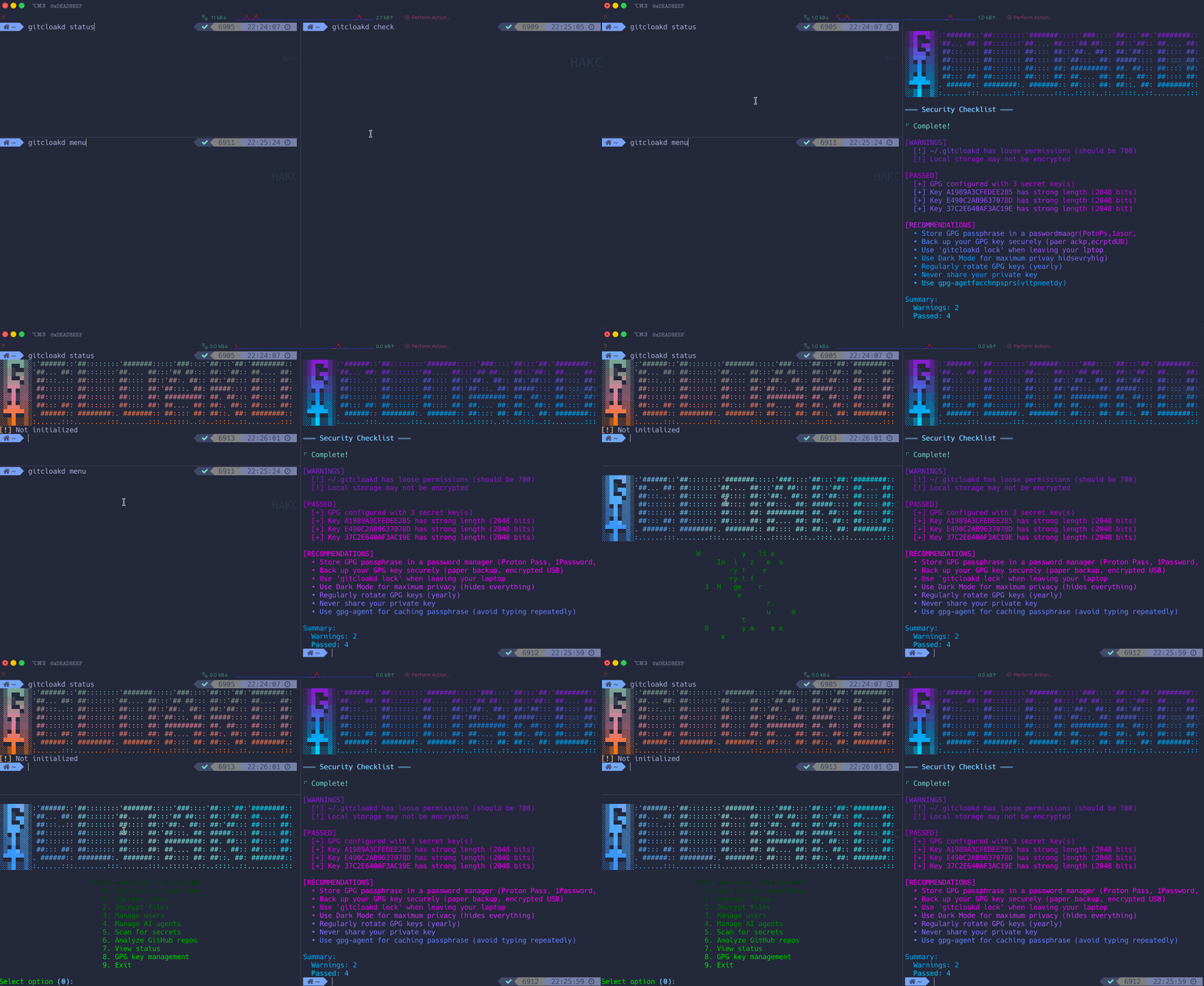
gitcloakd checkThis checks:
- GPG key strength and expiration
- Local storage encryption
- File permissions
- Configuration issues
# 1. Create GPG key if needed
gpg --full-generate-key
# 2. Initialize local protection
gitcloakd secure init
gitcloakd unlock
# 3. Initialize repository with dark mode
cd myproject
gitcloakd init --dark
# Enter real project name when prompted (will be encrypted)
# Note the UUID generated - use this for GitHub repo name!
# 4. Work on your code normally
# ... edit files, commit, etc ...
# 5. Before pushing - encrypt everything
gitcloakd encrypt --dark
git add -A
git commit -m "Updated encrypted state"
git push
# 6. Collaborator pulls and decrypts
git clone https://github.com/you/550e8400-e29b-... # UUID repo name
cd 550e8400-e29b-...
gitcloakd decrypt --dark
# Now they have full repo with history and real name!# Collaborator generates key and sends public key
gpg --armor --export colleague@example.com > colleague.pub
# You import and add them (with name visibility control)
gpg --import colleague.pub
# Option A: They can see real project name
gitcloakd dark add-user -e colleague@example.com -k THEIR_KEY_ID --reveal-name
# Option B: They only see UUID (maximum secrecy)
gitcloakd dark add-user -e colleague@example.com -k THEIR_KEY_ID --hide-name
# Re-encrypt to include new user
gitcloakd encrypt --dark
git add -A && git commit -m "Added team member" && git push ░▒█▀▀█▒░:'######::'##::::::::'#######:::::'###::::'##:::'##:'########::
░▒█░▄▄▒░'##... ##: ##:::::::'##.... ##:::'## ##::: ##::'##:: ##.... ##:
░▒█▄▄▀▒░ ##:::..:: ##::::::: ##:::: ##::'##:. ##:: ##:'##::: ##:::: ##:
░▒▀█▀▒▒░ ##::::::: ##::::::: ##:::: ##:'##:::. ##: #####:::: ##:::: ##:
░▒▒█░▒▒░ ##::::::: ##::::::: ##:::: ##: #########: ##. ##::: ##:::: ##:
░▒▄█▄▒▒░ ##::: ##: ##::::::: ##:::: ##: ##.... ##: ##:. ##:: ##:::: ##:
░▀▀█▀▀▒░. ######:: ########:. #######:: ##:::: ##: ##::. ##: ########::
░░▒█░░▒░:......:::........:::.......:::..:::::..::..::::..::........:::
| Command | Description | Flags |
|---|---|---|
init |
Initialize repository | --wizard, --full, --dark |
encrypt |
Encrypt files | --all, --full, --dark |
decrypt |
Decrypt files | --all, --full, --dark |
add-user |
Add collaborator | --email, --key-id, --fetch |
remove-user |
Revoke access | <email> |
clone |
Clone + auto-decrypt | <url> |
scan |
Scan for secrets | --deep |
analyze |
Analyze GitHub repos | |
status |
Show encryption status | --json |
check |
Security checklist | |
lock |
Lock local storage | |
unlock |
Unlock local storage | |
secure init |
Set up local protection | |
secure status |
Local storage status | |
secure wipe |
Destroy local data | --confirm |
dark info |
Show dark mode repo info | |
dark add-user |
Add user to dark mode | --reveal-name, --hide-name |
dark list-users |
List dark mode users | |
clean quick |
Quick cache clean | |
clean standard |
Standard clean | |
clean paranoid |
Aggressive clean | --confirm |
clean footprint |
Show data footprint | |
test create |
Create demo test repo | --path, --mode |
test dry-run |
Preview encryption (no changes) | --mode |
test backup |
Backup repo before encryption | --output |
test verify |
Verify encryption works | |
menu |
Interactive menu |
Use gitcloakd programmatically in your code, CI/CD pipelines, or git hooks:
from gitcloakd import encrypt_files, encrypt_matching, decrypt_files
# Encrypt specific files
result = encrypt_files([".env", "config/secrets.yaml"])
print(f"Encrypted: {result['encrypted']}")
# Encrypt all files matching configured patterns
result = encrypt_matching()
# Or with custom patterns
result = encrypt_matching(["*.env", "*.key", "**/*.pem"])
# Decrypt files
result = decrypt_files([".env.gpg", "config/secrets.yaml.gpg"])Create .git/hooks/pre-commit:
#!/usr/bin/env python3
from gitcloakd import encrypt_staged
import subprocess
import sys
result = encrypt_staged()
if result['encrypted']:
print(f"Auto-encrypted {len(result['encrypted'])} files:")
for f in result['encrypted']:
print(f" {f}")
# Add encrypted version to staging
subprocess.run(["git", "add", f + ".gpg"])
if result['errors']:
print(f"Encryption errors: {result['errors']}")
sys.exit(1)| Function | Description |
|---|---|
encrypt_files(files) |
Encrypt specific files |
encrypt_matching(patterns) |
Encrypt files matching glob patterns |
encrypt_staged() |
Encrypt staged files (for pre-commit hooks) |
decrypt_files(files) |
Decrypt .gpg files |
is_initialized() |
Check if gitcloakd is set up |
get_encryption_patterns() |
Get configured patterns |
check_gpg() |
Check if GPG is installed |
from gitcloakd import encrypt_matching, is_initialized
if is_initialized():
result = encrypt_matching()
if result['errors']:
raise Exception(f"Encryption failed: {result['errors']}")
print(f"Encrypted {len(result['encrypted'])} files")graph TB
subgraph CLI["CLI Commands"]
INIT(init)
ENC(encrypt/decrypt)
SEC(secure)
CLEAN(clean)
DARK(dark)
CHECK(check)
end
subgraph Core["Encryption Engines"]
SELECTIVE(Selective Engine)
FULL(Full Encryption)
DARKMODE(Dark Mode)
STORAGE(Secure Storage)
AUDIT(Audit Log)
CLEANER(Memory Cleaner)
end
subgraph Data["Protected Data"]
REPO[(Repository)]
LOCAL[(~/.gitcloakd)]
end
INIT --> SELECTIVE
INIT --> FULL
INIT --> DARKMODE
ENC --> SELECTIVE
ENC --> FULL
ENC --> DARKMODE
DARK --> DARKMODE
SEC --> STORAGE
CLEAN --> CLEANER
CHECK --> STORAGE
CHECK --> REPO
SELECTIVE --> REPO
FULL --> REPO
DARKMODE --> REPO
STORAGE --> LOCAL
AUDIT --> LOCAL
CLEANER --> LOCAL
style CLI fill:#34294f,stroke:#ff7edb,color:#ff7edb
style Core fill:#2b213a,stroke:#f97e72,color:#f97e72
style Data fill:#1a1a2e,stroke:#72f1b8,color:#72f1b8
| Requirement | Version | Purpose |
|---|---|---|
| Python | 3.9+ | Runtime |
| GPG | 2.x | Encryption |
| Git | 2.x | Version control |
════════════════════════════════════════════════════════════════════════════════
[*] Works on Linux, macOS, Windows
[*] No compilation required - pure Python
[*] GPG must be installed and configured with at least one key
════════════════════════════════════════════════════════════════════════════════

# Selective: encrypt specific files (.env, keys, etc.)
gitcloakd init --wizard
gitcloakd encrypt
# Full: encrypt entire codebase
gitcloakd init --full
gitcloakd encrypt --full
# Dark: encrypt everything including history and repo name
gitcloakd init --dark
gitcloakd encrypt --darkgitcloakd test create --mode dark # Create demo repo with fake secrets
gitcloakd test dry-run --mode full # Preview changes (no modifications)
gitcloakd test backup # Backup before encrypting
Encrypts only files matching patterns (.env, *.key, *.pem, etc.). Source code stays readable. Normal git workflow.
gitcloakd init --wizard
gitcloakd encryptgraph LR
A[main.py] --> B[main.py<br/>unchanged]
C[.env<br/>API_KEY=secret] --> D[.env.gpg<br/>encrypted]
style C fill:#fe4450,stroke:#fe4450,color:#fff
style D fill:#72f1b8,stroke:#72f1b8,color:#1a1a2e

Packs entire codebase into single encrypted blob. Git history preserved. Unauthorized users see only encrypted.gpg.
gitcloakd init --full
gitcloakd encrypt --fullWhat unauthorized users see:
myrepo/
  .gitcloakd/          # config
  encrypted.gpg         # your entire codebase
  README.md             # "this repo is encrypted"

Encrypts code, git history, commit messages, and replaces repo name with random UUID. Zero metadata leakage.
gitcloakd init --dark
gitcloakd encrypt --dark
What's hidden in Dark Mode:
| Item | Selective | Full | Dark |
|---|---|---|---|
| Source code | Visible | Hidden | Hidden |
| File structure | Visible | Hidden | Hidden |
| Git history | Visible | Visible | Hidden |
| Commit messages | Visible | Visible | Hidden |
| Branch names | Visible | Visible | Hidden |
| Contributors | Visible | Visible | Hidden |
| Project name | Visible | Visible | Hidden (UUID) |
graph TB
    subgraph Real[Real Repository]
        R1[my-secret-project]
        R2[Source Code]
        R3[100 commits, 5 branches]
        R4[Contributors List]
    end

    subgraph Visible[What Unauthorized Users See]
        V1[550e8400-...<br/>random UUID]
        V2[encrypted.gpg]
        V3[Single commit]
    end

    Real -->|GPG Encrypt| Visible

    style Real fill:#72f1b8,stroke:#72f1b8,color:#1a1a2e
    style Visible fill:#1a1a2e,stroke:#ff7edb,color:#ff7edb
════════════════════════════════════════════════════════════════════════════════
  DARK MODE LIMITATION:

  Single encrypted blob = no merge capability. Whoever pushes last wins.

  Best for:
  [*] Solo projects you want hidden
  [*] Archiving finished projects
  [*] Repos where one person pushes and others just pull/read

  For active team collaboration, use Selective Mode instead.
════════════════════════════════════════════════════════════════════════════════

Laptop stolen? They could see what repos you manage, your command history, cached secrets. Unless you encrypt all that too.
gitcloakd secure init    # Set up encrypted local storage
gitcloakd unlock         # Decrypt to work
gitcloakd lock # Re-encrypt when done| Data | Without secure init | With secure init |
|---|---|---|
| Repo list | Plaintext | GPG Encrypted |
| Command history | Plaintext | GPG Encrypted |
| Cached tokens | Plaintext | GPG Encrypted |

# Import their GPG key
gpg --import colleague.pub

# Add to repository
gitcloakd add-user --email colleague@example.com --key-id THEIR_KEY_ID

# Re-encrypt to include new user
gitcloakd encrypt --dark
git add -A && git commit -m "Add collaborator" && git pushControl whether users see the real project name or only the UUID:
# User sees real name
gitcloakd dark add-user -e user@example.com -k KEY_ID --reveal-name

# User sees only UUID (maximum secrecy)
gitcloakd dark add-user -e user@example.com -k KEY_ID --hide-namegitcloakd remove-user colleague@example.com
gitcloakd encrypt --dark
git add -A && git commit -m "Revoke access" && git push
from gitcloakd import encrypt_files, decrypt_files, encrypt_matching

# Encrypt specific files
encrypt_files([".env", "config/secrets.yaml"])

# Encrypt all files matching patterns
encrypt_matching(["*.env", "*.key", "**/*.pem"])

# Decrypt
decrypt_files([".env.gpg"])#!/usr/bin/env python3
from gitcloakd import encrypt_staged
import subprocess, sys
result = encrypt_staged()
if result['encrypted']:
for f in result['encrypted']:
subprocess.run(["git", "add", f + ".gpg"])
if result['errors']:
sys.exit(1)
| Command | Description |
|---|---|
init |
Initialize encryption (--wizard, --full, --dark) |
encrypt |
Encrypt files (--all, --full, --dark) |
decrypt |
Decrypt files (--all, --full, --dark) |
status |
Show encryption status |
check |
Run security audit |
add-user |
Add collaborator |
remove-user |
Revoke access |
secure init |
Set up local protection |
lock / unlock |
Lock/unlock local storage |
test create |
Create demo repo |
test dry-run |
Preview changes |
test backup |
Backup before encryption |
clean paranoid |
Secure cleanup |

- Source code (Full/Dark modes)
- Sensitive files (all modes)
- Git history and commits (Dark mode)
- Project name (Dark mode)
- Local workstation data (with
secure init)
- Repository existence on GitHub (repo visible, contents encrypted)
- Network traffic (use HTTPS/SSH)
- Runtime secrets (use proper secret management)
- OS swap files or SSD wear leveling (use full-disk encryption)
| Threat | Selective | Full | Dark |
|---|---|---|---|
| Accidental secret commit | Yes | N/A | N/A |
| Unauthorized code access | No | Yes | Yes |
| Git history analysis | No | No | Yes |
| Project discovery | No | No | Yes |
| Server breach (GitHub) | Partial | Yes | Yes |
| Laptop theft | With secure init | With secure init | With secure init |

| Tool | Full Repo | Git History | Repo Name | Local Protection |
|---|---|---|---|---|
| gitcloakd | Yes | Hidden (Dark) | UUID (Dark) | Yes |
| git-crypt | No | Visible | Visible | No |
| git-secret | No | Visible | Visible | No |
| BlackBox | No | Visible | Visible | No |
| SOPS | No | Visible | Visible | No |
════════════════════════════════════════════════════════════════════════════════
  WHY GITCLOAKD:

  git-crypt, git-secret - they still leak:
  [*] Project name
  [*] File structure
  [*] Git history and commit messages
  [*] Contributors and timestamps

  gitcloakd Dark Mode? They see NOTHING. UUID-named repo. Single encrypted blob.
════════════════════════════════════════════════════════════════════════════════
════════════════════════════════════════════════════════════════════════════════

  USE AT YOUR OWN RISK.

  Lose your GPG key or passphrase? Your data is GONE.
  No recovery. No backdoor. No magic fix.

  Back up your keys or cry later.

════════════════════════════════════════════════════════════════════════════════
MIT
Developed by the haKC.ai collective
Part of the SecKC (Kansas City Security) community
stay encrypted