What is CSS?
- CSS stands for Cascading Style Sheets
- CSS describes how HTML elements are to be displayed on screen, paper, or in other media
- CSS saves a lot of work. It can control the layout of multiple web pages all at once
- External stylesheets are stored in CSS files
A CSS rule-set consists of a selector and a declaration block:
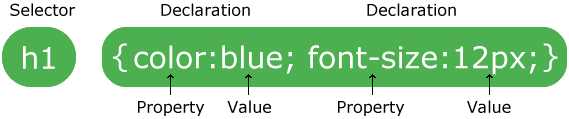
- The element selector
p {
     text-align: center;
     color: red;
}- The id selector
#para1 {
    text-align: center;
    color: red;
}- The class selector
.center {
    text-align: center;
    color: red;
}- External style sheet
<link rel="stylesheet" type="text/css" href="mystyle.css">
- Internal style sheet
<head>
<style>
body {
    background-color: linen;
}
</style>
</head>
- Inline style
<h1 style="color:blue;margin-left:30px;">This is a heading</h1>
What style will be used when there is more than one style specified for an HTML element?
Generally speaking we can say that all the styles will "cascade" into a new "virtual" style sheet by the following rules, where number one has the highest priority:
- 1,Inline style (inside an HTML element)
- 2,External and internal style sheets (in the head section)
- 3,Browser default
So, an inline style (inside a specific HTML element) has the highest priority, which means that it will override a style defined inside the tag, or in an external style sheet, or a browser default value.
Colors in CSS are most often specified by:
- a valid color name - like "red"
- an RGB value - like "rgb(255, 0, 0)"
- a HEX value - like "#ff0000"
The CSS background properties are used to define the background effects for elements.
CSS background properties:
- background-color
- background-image
- background-repeat
- background-attachment
- background-position
body {
    background-image: url("img_tree.png");
    background-repeat: no-repeat;
    background-position: right top;
}
body {
background-image: url("img_tree.png");
background-repeat: no-repeat;
background-position: right top;
background-attachment: fixed;
}body {
background: #ffffff url("img_tree.png") no-repeat right top;
}The border-style property specifies what kind of border to display.
The following values are allowed:
dotted- Defines a dotted borderdashed- Defines a dashed bordersolid- Defines a solid borderdouble- Defines a double bordergroove- Defines a 3D grooved border. The effect depends on the border-color valueridge- Defines a 3D ridged border. The effect depends on the border-color valueinset- Defines a 3D inset border. The effect depends on the border-color valueoutset- Defines a 3D outset border. The effect depends on the border-color valuenone- Defines no borderhidden- Defines a hidden border