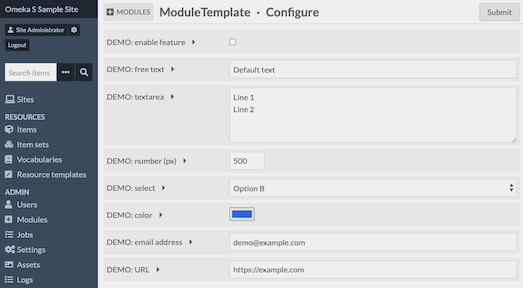
This repository provides a minimal, modern template for building custom modules for Omeka S. It includes a Docker-based dev environment, packaging helpers, i18n utilities, and a clean starting structure.
- Requirements: Docker Desktop 4+, Make
- Start stack:
make upthen openhttp://localhost:8080 - Stop stack:
make down
This template uses the image erseco/alpine-omeka-s:develop, which boots Omeka S with sensible defaults and tooling.
- A ready-to-use CSV lives at
data/sample_data.csv. - On first boot, the container will automatically import it if present.
- Import manually any time:
make import-sample
Users created automatically:
admin@example.com(global_admin) password:PLEASE_CHANGEMEeditor@example.com(editor) password:1234
make up/make upd: Run in foreground/backgroundmake down/make clean: Stop, optionally remove volumesmake logs: Tail container logsmake shell: Shell into theomekascontainermake import-sample: Import the CSV at$OMEKA_CSV_IMPORT_FILEmake enable-module: Enable this module inside Omeka Smake test: Run PHPUnit testsmake package VERSION=x.y.z: Build a distributable ZIP
Run make help to see all targets.
ModuleTemplate/
├── config/
│   └── module.ini               # Module metadata
├── src/
│   └── Module.php               # Main module class (entry point)
├── view/                        # Templates (optional)
├── asset/                       # Static assets (JS, CSS, images)
├── language/                    # Translations (.po/.mo)
├── test/                        # Unit tests and bootstrap
├── data/sample_3d_data.csv      # Optional sample dataset for CSVImport
├── docker-compose.yml           # Dev stack using alpine-omeka-s:develop
├── Makefile                     # Dev helpers (docker, i18n, tests, packaging)
└── README.md                    # This file
- Rename namespaces in
composer.jsonand undersrc/to your module’s name. - Update
config/module.iniwith your module’s metadata. - Adjust
docker-compose.ymlto mount your module directory name in/var/www/html/volume/modules/<YourModule>.
- Omeka S 4.x or later
- PHP 7.4+ for development (module code can target higher, adjust
composer.jsonaccordingly)
Published under the GNU GPLv3 license. See LICENSE.