

As an online user
I want the app to automatically load list of most active cryptocurrencies with live price updates
So I can always enjoy the newest price of list cryptocurrencies
Given the user has connectivity
When the user requests to see list of most active cryptocurrencies
Then the app should display list of most active cryptocurrencies with live price updates from remote
- Display a list of at least 50 tickers
- Display news related to the currency selected upon tapping a cell
- Show live price updates using Web Socket
- Pull to refresh from the CryptoList
- Show the correct ticker color (green when the price increases and red for the opposite)
- Handle network errors
- Using URLSession for load data coin and news
- Using URLSessionWebSocketTask for load live price updates from Websocket
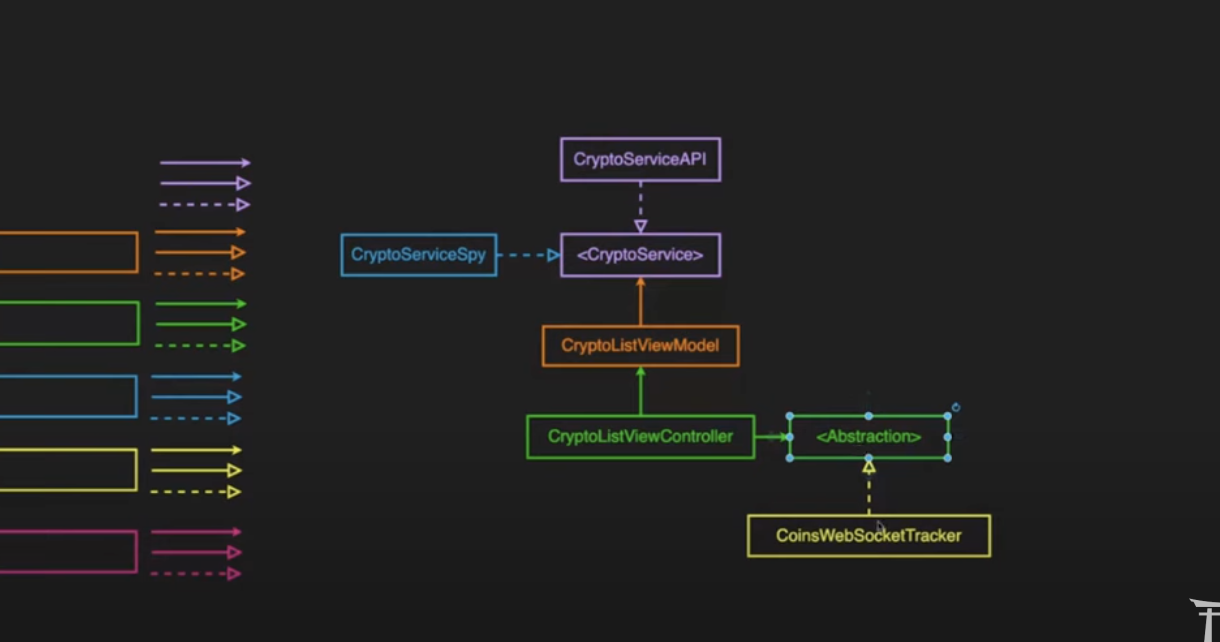
I applied clean architecture in all my modules. you can see that the app is including the following modules:
- API module
- Feature/Domain module
- UI and Presentation module
For the API module I used URLSession to handle the HTTP calls, Of course, the app has been implemented in a way that we can use any framework or third parties like Alamofire.
For the Presentation module I used MVVM Design pattern, and I've tried to decouple all my modules using protocols, so you can find that I hide the implementation details by using protocols. The UI as a whole is a single horizontal slice.
For the Feature/Domain module I have separated the features into folders which are completely agnostic of the ui layer and the data layers(api/cache) and can be easily be converted into a feature slice/framework depending on requirements .
Finally, I composed all the module inside the SceneDeelgate.
- Complete unit tests for Feature/Domain module
- Complete unit tests for Presentation module

- Unit Testing for WebSocket layer
- unit tests for network layer
- add snapshot tests to add a safety net for UI bugs
- add dark mode
- add support for landscape
- make modularization with vertical slicing each feature with its ui counterpart in a separate branch
- Make sure you have Xcode 13.2.1 or above
- Open CryptoList.xcodeproj
- Run unit testing using
cmd + U - Run project to simulator or real device using
cmd + R