This is the second project under 'OOP Course', this exercise splits into two main parts,
The part is about file making with random number of lines in each file and using the "File making algorithm" trough three ways of action and the amount of time each action took.
- Using text file line counter algorithm by basic function.
- Using text file line counter algorithm by using a thread.
- Using text file line counter algorithm by using a thread pool.
In this part, our main target was to create something that's "missing" from java functions, and it was to create a Thread pool using recycled threads and to send tasks into the thread pool to be executed by they're priority.
The image above is a breakdown diagram about part A.
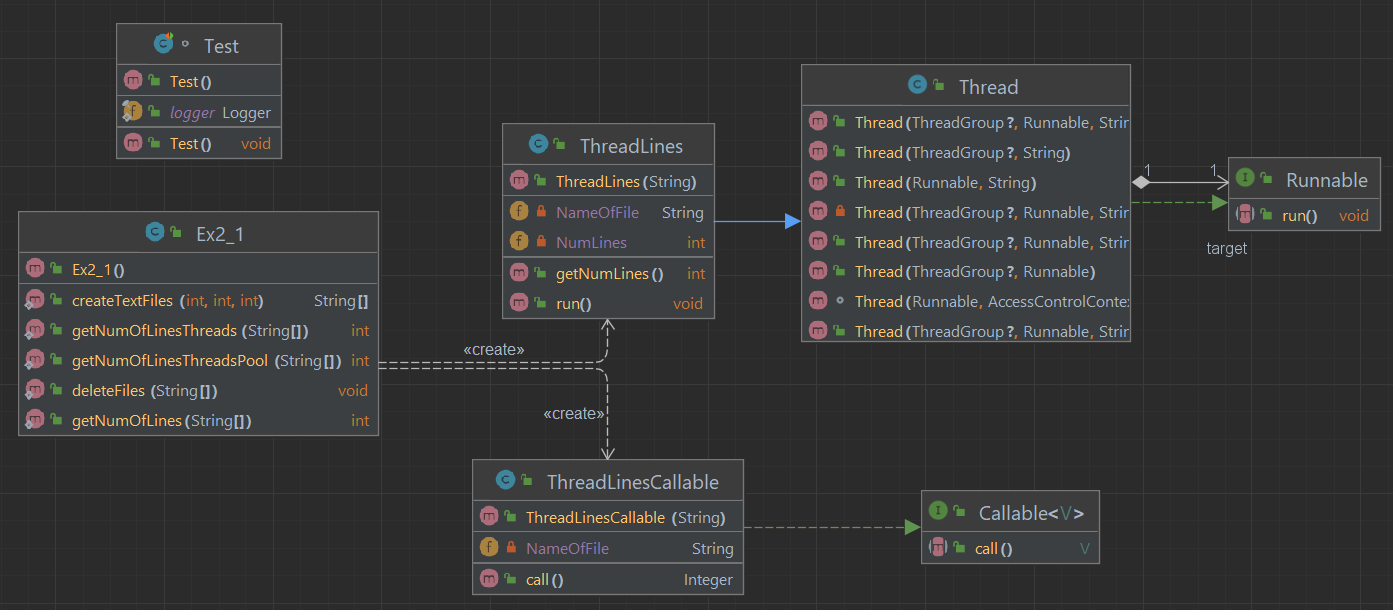
This class holds 5 main methods, including:
- createTextFiles(int n, int seed, int bound) -> n - Number of files , seed - generate a generator of random numbers , bound - limit of lines
- getNumOfLines(String[] fileNames) -> Returns num of lines.
- getNumOfLinesThreads(String[] fileNames) -> Returns num of lines using a thread.
- getNumOfLinesThreadsPool(String[] fileNames) -> Returns num of lines using a thread pool.
- deleteFiles(String[] filenames) -> Deletes the created files.
This class extends Thread, overriding the run() function to use as a thread by returning the number of lines in a file.
This class extends Callable, overriding the call() function to use it as a Callable object (Thread that returns value). it's return the number of lines in a file.We use a Future type array to save every return of the Threads.
We can say that the main idea here was to see the pros and cons of Thread, Thread pool and basic function abilities and consumption. As already said, we can split the explanation into three parts:
      long startTime = System.currentTimeMillis();
      int sum = getNumOfLines(namefile); / getNumOfLinesThreads(namefile) / getNumOfLinesThreadsPool(namefile)
      long endTime = System.currentTimeMillis();
      logger.info(()->"Time calculation : "+(endTime - startTime)+" ms with a total of :"+sum+" lines.");
- These are the results
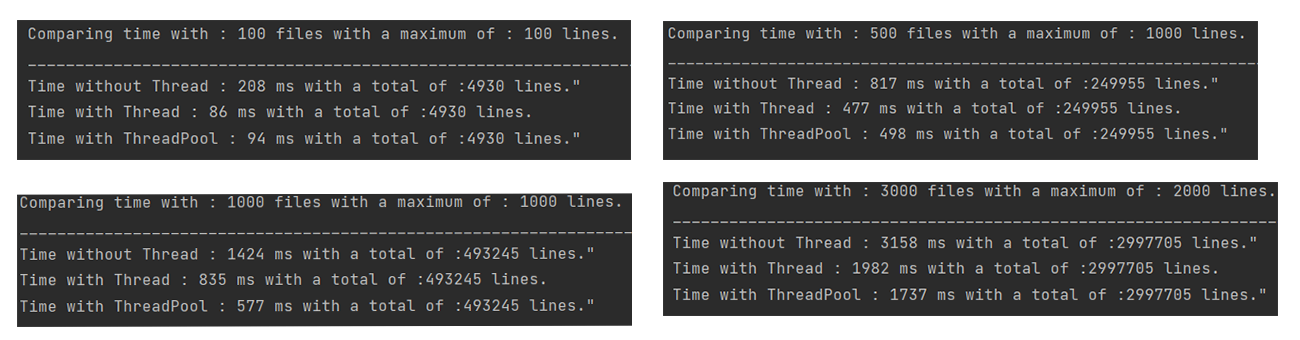
As we can see threads are not only in theory should preform better time wise, it actually happens and we see the power of threads working on with this project. The main reason for these results is that a thread is able to execute in parallel with other threads, which means that it can use several cores of a processor to perform tasks simultaneously.
Using JUnit testing we made sure that every method works as intended and the time stamps and calculation was right for the tasks given.
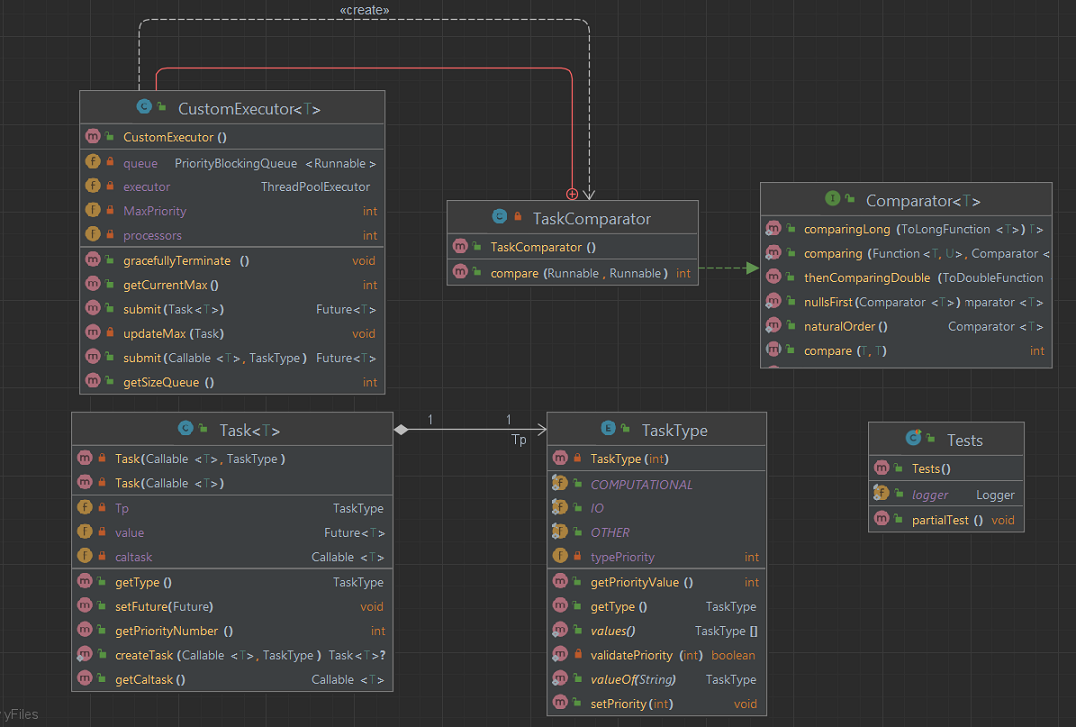
TaskType is a enum class used for classification and priority of the tasks that should be added to "PriorityBlockingQueue" in the future.
Including the methods:
- getPriorityValue() -> Returns the priority value of a task.
- getType() -> Returns the task type.
- validatePriority (int priority) -> Checks for valid priority value.
- setPriority(int priority) -> Sets priority to a task.
Task class main subject is to wrap and create a Task that will be inserted to a PriorityBlockingQueue working with Thread pool.
Task has three fields -> TaskType Tp , Callable caltask , Future value
Including these methods:
- getType() -> Returns the 'TaskType' of a Task.
- getPriorityNumber() -> Returns the priority number of a Task.
- getCaltask() -> Returns the Callable object.
- setFuture(Future future) -> Attaches a Future object to 'catch' the returned value that the Callable object will return.
CustomExecutor is a singleton class that provides a way to execute tasks with different priorities. The class uses a PriorityBlockingQueue to store the tasks, and a ThreadPoolExecutor to execute them. The tasks are compared based on their priority, and the task with the highest priority is executed first.
CustomExecutor has four fields -> PriorityBlockingQueue queue , ThreadPoolExecutor executor , int processors , int MaxPriority
Including these methods:
- submit(Callable calTask, TaskType Tp) -> Adds a 'Task' to the Thread pool using Callable object and TaskType.
- submit(Task task) -> Adds a 'Task' to the Thread pool using only Task object.
- gracefullyTerminate() -> Will terminate the thread pool as soon as it the whole queue submitted to it.
- getSizeQueue() -> Returns the queue size.
- updateMax(Task task) -> Updates the last submitted Task with the highest priority.
- getCurrentMax() -> using updateMax(Task task) Will return the highest priority task in the queue.
One of the project requirements was to write about the difficulties in the journey of making it happen and how we managed to get through it,
the main issue here was that using the CustomExecutor as a thread pool and with it PriorityBlockingQueue that will send Tasks to the thread pool by they're TaskType priority order.
Unfortunately it took us longer than expected to solve it, but finally we did manage to get through it by adding the inner class that I'm about to present below.
TaskComparator is an inner class that came to solve the main issue of the project, the casing issue that appears when trying to add the PriorityBlockingQueue that implements Runnable interface and built to accept FutureTask objects. FutureTask objects does not have the abbility to compare between two instances and here comes the main reason of the TaskComparator class making.
We needed to create that inner class CustomExecutor (tasks threadpool) for it to be able prioritized the Queue -> [PriorityBlockingQueue (Tasks queue sorted by TaskType)]
By implementing Comparator interface and overriding the compareTo method and using the fundamentals of 'Extender Design pattern' in this situation we extended the CustomExecutor abbilities and made them work together.
Working alongside with S.O.L.I.D design pattern, we made sure to apply single responsibility by making inner classes or separating a class into two if needed, open-closed principle guide us in every project's class.
- Adapter pattern, The TaskComparator class acts as an adapter between the PriorityBlockingQueue and the Task class. It adapts the comparison of Runnable objects to the comparison of the priority of Task objects.
- Singleton pattern, CustomExecutor class is implemented as a singleton. There is no way to create multiple instances of CustomExecutor.
- Factory pattern, The submit method uses the factory pattern to create the Task object. Strategy pattern, The TaskComparator class represents a strategy for comparing the tasks based on their priority. The comparator can be easily replaced with a different strategy.
Using JUnit testing we made sure that every method works as intended that every tasks that has been summited was actually got into the thread pool and if should return a value that it was returning it.