Home
All reversing documented here is currently based on the client beta 0.9. Our work is now heavily based on the TCoS SDK from humm3rjack.
--show_console: show the console displaying the log (you can also take control of the console and use some functions/load packages)
--packet_log: enable logging of the packets send and received
--world universeID: bypass universe selection and ask for the universe with ID universeID
-- uc_debugger: (check syntax) attach unreal engine debugger to the process. Sadly scripts files are not reachable.
--unreal_log: seems to do nothing. Test
--ipc //d_mmos, unknown
--wait_shutdown //d_mmos, unknown
TCoS client encodes its strings in UTF16-LE. Wiki info on UTF16-LE
In etc/client/sb_client.rc, modify the line with **client/net/login_addr = 87.249.97.4:22233 ** with the desired IP and port.
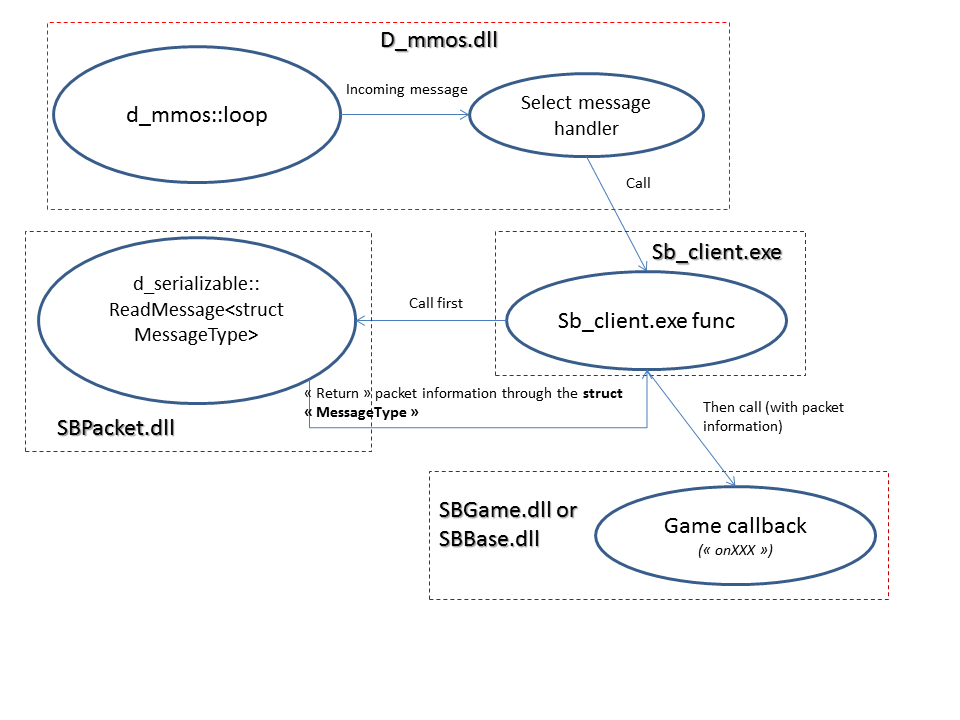
The methods called in SB_client makes the work of calling the ReadMessage and the "onBlablabla" callback related to it.
So by studying these methods, we should be able to understand the data wanted in the packet, and maybe even the struct MessageType layout.
Contains low level functions for sending packets.
Interesting places:
- d_message class with read (void* dataOut, uint dataSize) and write (const void* dataIn, uint dataSize)
- d_address class: represent IP+Port
void* dataOut is a pointer to a memory location where the value read will be stored. Sometimes this memory is in stack, sometime in heap. It totally depends of the caller. For instance if the client tries to read a string, dataOut will be a pointer to the std::string::data () (or equivalent).
uint dataSize is the size in bytes of the value you want to read. For instance if you want to read a DWORD (double word = 4 bytes) its value will be 4.
The d_message object keeps track of the data you've read in it. So each time you call its read method, it updates an internal value with the size of data already read (it simply adds dataSize to its current value). This is also an offset allowing it to know where to begin the reading of the data in the message. Each time you call read, you actually ask to read the next data in the d_message object. If there is no more data, or not enough (there is still 2 bytes and you ask to read 4 bytes), the method will raise an exception.
Work the same way than read but write dataSize bytes of data pointed by dataIn inside the d_message. Same mechanism checking that not too much data is written.
Contains packet high level stuff. Use templates a lot, which means that the window 'Names' in IDA won't show you all the methods because the same actual method can be exported with multiples names (not apparing in 'Names' but only in 'Exports'). So, look in 'Exports' instead.
The interesting classes are d_packet and d_serializable where 'struct PACKET' is the template parameter. Interesting methods in d_packet:
- GetID ()
- GetName () (but actually the name is exactly the same as the template parameter name)
Interesting methods in d_message:
- ReadMessage (const struct d_message&)
- WriteMessage (struct d_message&)
/!\ /!\ /!\ ==>WriteMessage and ReadMessage are very interesting to study for each message because it's there you can understand what is put inside the packet.<== /!\ /!\ /!\
This is how I try to reverse packets, by studying these two methods and their context (who calls them, what structure do they fill etc).
To find quickly which message has a specific ID, in OllyDBG use "find command" and type move ax, ID where ID is a short number. It will point you the good GetID () method. The template parameter gives you the message name.
Note: packet's names follow a simple convention. They have a prefix specifying if its a packet sended by the client to the server or by the server to the client.
C2L: Client to Login server
L2C: Login server to Client
C2S: Client to Server
S2C: Server to Client
S2R: I think for server broadcast //valoo: i think this stands for relevance (as in for your client synced objects, some asserts gave messages of that relevance-kind)
There are other prefix but currently they are not involved in the phases I study.
Here is the dialog between client and server, don't know if it's very useful. For detailed info about the packets structure, see the section above.
Client sends CONNECT to Login Server (status code?)
Client sends C2L_USER_LOGIN (login + password)
Login Server answers L2C_USER_LOGIN_ACK (status code)
Client sends C2L_QUERY_UNIVERSE_LIST (no data)
Login Server answers L2C_QUERY_UNIVERSE_LIST_ACK (status code?, universes list with infos)
Client sends C2L_UNIVERSE_SELECTED (universe selected id)
Login Server answers L2C_UNIVERSE_SELECTED_ACK (universe package's name, universe (game server) IP + port, and tkey)
Client sends CONNECT to Game Server
Beginning of the conversatiom between Client and Game Server
Client sends C2L_TRAVEL_CONNECT to Game Server (with tkey)
Client sends DISCONNECT to Login Server (disconnection reason "connect to game world")
Conversation between Client and Login Server is now over.
Game Server sends S2C_WORLD_PRE_LOGIN (world setup id, must be 1 to load character selection screen, then world ID begin to 100 with PT_Hawksmouth etc)
Client answers C2S_WORLD_PRE_LOGIN_ACK
Game Server sends S2C_CS_LOGIN (sends two DWORDS with '0' as value to load the character creation screen, but here you can also sends character data to display already existing characters) Note: I think here we can cheat and send directly a world login, but as it is not obvious what to put in it, looking through the data in the character selection/creation phase should help a lot
After validating a character, client sends C2S_CS_CREATE_CHARACTER (lots of data)
Server answers S2C_CS_CREATE_CHARACTER_ACK
After clicking on "Enter World", Client sends C2S_CS_SELECT_CHARACTER (character id)
Server answers S2C_CS_SELECT_CHARACTER_ACK (MYSTERIOUS DWORD)