A lightweight, interrupt-driven hook for USB CDC (SerialUSB) on the OpenCR board.
By default, SerialUSB on the OpenCR isn’t tied to a hardware UART, so you can’t attach a traditional serial interrupt. This patch injects a fast, non-blocking callback at the USB CDC endpoint, allowing your sketch to handle incoming USB data via an interrupt-like mechanism.
-
Locate usbd_cdc.c in your local Arduino package folder. For example on Windows:
C:\Users\<YourUser>\AppData\Local\Arduino15\packages\OpenCR\hardware\OpenCR\1.5.3\variants\OpenCR\hw\usb_cdc\usbd_cdc.c -
Open usbd_cdc.c and add the following before the USBD_CDC_DataOut function:
// Weak callback for USB CDC RX interrupt
attribute((weak)) void usbSerialRxInterrupt(uint8_t *data, uint32_t length) {}
-
In USBD_CDC_DataOut, after the Receive(...) call and before return USBD_OK;, insert:
usbSerialRxInterrupt(hcdc->RxBuffer, hcdc->RxLength);
-
The modified section will look like this:
if (pdev->pClassData != NULL) {
((USBD_CDC_ItfTypeDef *)pdev->pUserData)->Receive(hcdc->RxBuffer, &hcdc->RxLength);
// Invoke the weak callback
usbSerialRxInterrupt(hcdc->RxBuffer, hcdc->RxLength);
return USBD_OK;
} else {
return USBD_FAIL;
}
-
So at the end it will look like:
__attribute__((weak)) void usbSerialRxInterrupt(uint8_t *data, uint32_t length) {}

/**
  * @brief  USBD_CDC_DataOut
  *         Data received on non-control Out endpoint
  * @param  pdev: device instance
  * @param  epnum: endpoint number
  * @retval status
  */
static uint8_t  USBD_CDC_DataOut (USBD_HandleTypeDef *pdev, uint8_t epnum)
{
  USBD_CDC_HandleTypeDef   *hcdc = (USBD_CDC_HandleTypeDef*) pdev->pClassData;

  /* Get the received data length */
  hcdc->RxLength = USBD_LL_GetRxDataSize (pdev, epnum);

  /* USB data will be immediately processed, this allow next USB traffic being
  NAKed till the end of the application Xfer */
  if(pdev->pClassData != NULL)
  {
    ((USBD_CDC_ItfTypeDef *)pdev->pUserData)->Receive(hcdc->RxBuffer, &hcdc->RxLength);
    usbSerialRxInterrupt(hcdc->RxBuffer, hcdc->RxLength);
    return USBD_OK;
  }
  else
  {
    return USBD_FAIL;
  }
}
-
Save the file and restart your Arduino IDE so the change takes effect.
In your .ino file, implement the weak callback:
extern "C" void usbSerialRxInterrupt(uint8_t *data, uint32_t length) {
// Your interrupt-like handler, e.g., buffer data or toggle a flag.
}
This function will be called for each incoming USB packet, allowing you to process data immediately.
Notes The callback is marked weak, so you only need to define it in one place.
Keep the handler short and non-blocking to avoid delaying USB traffic.
This approach works with the stock OpenCR USB CDC driver.
If your callback code is long‑lasting or too heavy, the OpenCR may fail to enumerate as a USB device or open the COM port—preventing uploads. To recover:
- Press and hold
PUSH SWITCH2, then press and release RESET while still holdingPUSH SWITCH2. - Release
PUSH SWITCH2. The board will enter bootloader (recovery) mode. - Upload an empty sketch.
- If it still won’t come back online, remove the
usbSerialRxInterrupt(...)line you added toUSBD_CDC_DataOut(it indicates something in your handler is blocking too long).
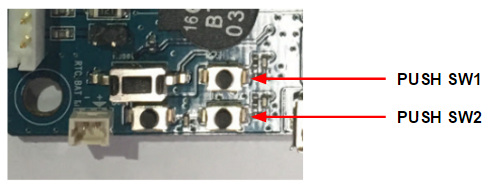
Image source: emanual.robotis.com