
One-click delete apps solution via ADB
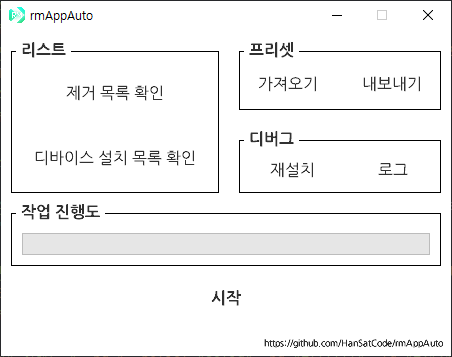
It's auto-ADB program that easily delete apps that are not normally erased from Android devices (e.g. cellular apps).
Also, this program was made so that I study module and text I/O in python :D
You can click here or download the latest release from 'release'.
| Section | Button | Note |
|---|---|---|
| 리스트 | 제거 목록 확인 | View the uninstall list. The uninstall list must be in package format (e.g. com.~). Each app is separated by an line-alignment. The subscript "package:" is deleted when this program is running. The list is stored in 'remove_list.txt'. |
| 디바이스 설치 목록 확인 | View package names of all installed apps on the connected device. It may take some time depending on the status of the installed apps and devices. Readed package names are stored in 'readed_list.txt'. | |
| 프리셋 | 가져오기 | Ovewrites 'remove_list.txt' from external preset. |
| 내보내기 | Stores a preset based on the current 'remove_list.txt'. | |
| 디버그 | 재설치 | Download ADB (i.e. platform-tools) again. An Internet connection is required to do this operation. |
| 로그 | View the operation histories of the program. | |
| 작업 진행도 | - | Views progress when performing main task other than the above functions. |
| - | 시작 | Delete apps from connected device based on the uninstall list. It may take some time depending on the status of the installed apps and devices. Successed/failed of deletion is recorded in log (i.e. 'log.txt'). |
Don't uninstall system apps using this program thoughtlessly.
I'm not responsible for any problems caused after uninstall system apps.