
🚀 An open-source, AI-powered Telegram bot that recognizes songs from voice messages, videos, streaming links, and lyrics. It offers features beyond standard music recognition bots like ShazamBot.


Here’s how the bot works in action:

Try it now! 👉 t.me/EnaFinderBot
| Feature | Description |
|---|---|
| 🎶 Search Songs | Find songs by name, lyrics, or artist. |
| 🎤 Voice Recognition | Identify songs from voice messages. |
| 🎥 Video Song Recognition | Extract and identify songs from videos. |
| 🔗 Streaming Link Search | Get song details from Spotify, Apple Music, etc. |
| 🌍 1500+ Website Support | Extract songs from thousands of platforms. |
| 📂 File Download | Send full song files with metadata. |
| 🎼 Lyrics Fetching | Get full song lyrics. |
| 📌 Inline Search | Search for songs directly in Telegram. |
| 🏆 Admin Panel | Manage bot settings with an admin interface. |
| 🌎 Multi-Language | Supports 20+ languages with customizable text. |
Want to self-host this bot? Follow these steps:
# Clone the repository
git clone https://github.com/Enalite/OpenShazamBot.git
cd OpenShazamBot

# Create a virtual environment (recommended)
python -m venv venv
source venv/bin/activate  # On Windows use: venv\\Scripts\\activate

# Install dependencies
pip install -r requirements.txt

# Install FFmpeg (required for audio processing)
# On Debian/Ubuntu:
sudo apt update && sudo apt install ffmpeg

# On macOS (using Homebrew):
brew install ffmpeg

# On Windows (scoop):
scoop install ffmpegBefore running the bot, you need to configure the environment variables and database settings properly.
You can check out the database schema design here:
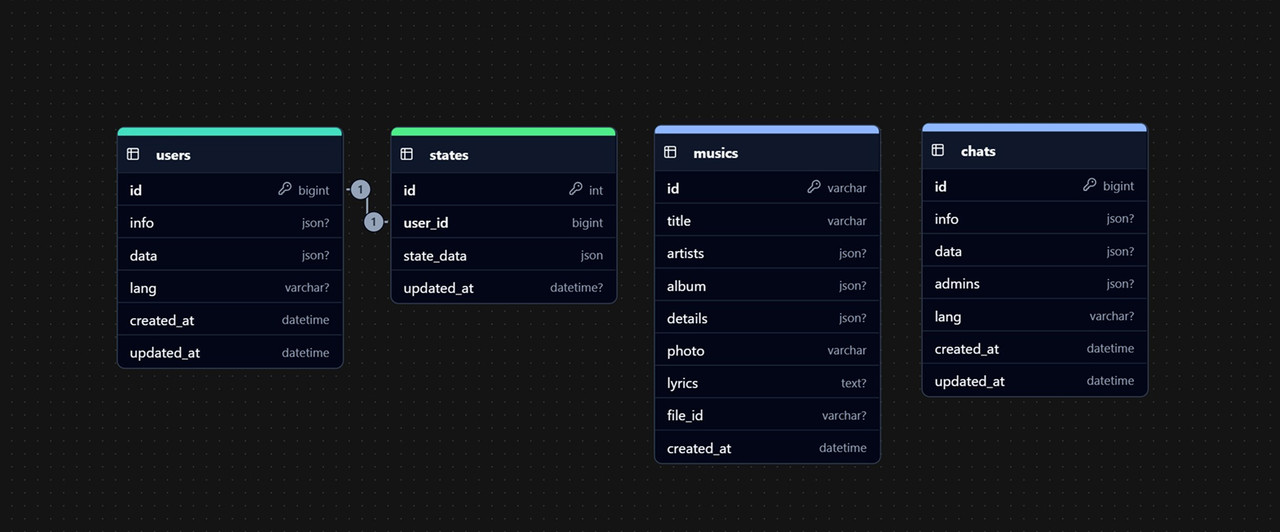
Ensure you have installed one of the supported databases:
- SQLite (default, lightweight, no setup required)
- PostgreSQL
- MySQL / MariaDB
Install the corresponding database driver:
# SQLite (default, lightweight, no extra package needed)
# Use aiosqlite for asynchronous SQLite support
pip install aiosqlite

# PostgreSQL (async support)
pip install asyncpg

# MySQL / MariaDB (async support)
pip install aiomysqlChange variables of the .env file in the root directory and define the required variables:
# Database Connection URL
DATABASE_URL=sqlite+aiosqlite:///database.db  # Default SQLite database

# DATABASE_URL=postgresql+asyncpg://user:password@localhost/db_name
# DATABASE_URL=mysql+aiomysql://user:password@localhost/db_name

# Webhook Secret Key (for security purposes)
SECRET=your_webhook_secret

# Telegram Bot Token
TOKEN=your_bot_token_hereThe app/config.py file contains extra configuration options to fine-tune the bot's behavior:
class Config:
    DATABASE_URL = os.getenv("DATABASE_URL")
    SECRET = os.getenv("SECRET")
    TOKEN = os.getenv("TOKEN")

    # Control whether to allow downloading from generic/less popular sources
    IS_GENERIC_URL_OK = False

    # File size limits (in MB) - set to 0 to disable
    DOWNLOAD_VIDEO_SIZE_IN_MB = 20  # Max 20MB
    DOWNLOAD_VOICE_SIZE_IN_MB = 5
    DOWNLOAD_URL_SIZE_IN_MB = 40

    # Telegram API configurations
    BASE = "api.telegram.org"
    WEBHOOK_URL = ""  # Example: https://yourdomain.com/webhook
    WEBHOOK_PATH = ""  # Example: /webhook

    # Placeholder audio file for loading state
    LOADING_SONG = "https://s3.filebin.net/filebin/c08376ec0ac682f9575943f68e78dcf61f5a9c9d6b3bc9f9ccb3420a72a53f63/0f0217efbd0328b4c312f8bc31ffe13449d5f3bd401ed2533c3b56e7199b8f6f?X-Amz-Algorithm=AWS4-HMAC-SHA256&X-Amz-Credential=7pMj6hGeoKewqmMQILjm%2F20250328%2Fus-east-1%2Fs3%2Faws4_request&X-Amz-Date=20250328T233625Z&X-Amz-Expires=60&X-Amz-SignedHeaders=host&response-cache-control=max-age%3D60&response-content-disposition=filename%3D%22clear-silent-track.mp3%22&response-content-type=audio%2Fmpeg&X-Amz-Signature=dbefa68d24d1295f89e235e9b79ac43ab0706f53540a7a88a3a800e2b7848446"

    # Path for storing session cookies (if needed)
    COOKIES_PATH = None

    # Telegram Admin User ID (for bot management)
    ADMIN = 1000000  # Replace with actual admin ID

    # Load default bot response texts from JSON
    with open(os.path.join("app", "data", "default_texts.json")) as f:
        DEFAULT_TEXTS = json.load(f)

config = Config()To modify default bot responses, edit the app/data/default_texts.json file.
It contains a dictionary where keys represent language codes (e.g., en, fr, de), and values store response texts.
Once configuration is complete, you can start the bot using either Polling or Webhook mode.
Simply run:
python main.py --pollingor:
python main.py -pFor webhook mode, specify the port (default: 8000):
python main.py --webhook --port=8000or:
python main.py -w --port=8000You also need to set up a reverse proxy (e.g., Nginx) to forward HTTPS traffic to port 8000.
| Argument | Alias | Description | Default |
|---|---|---|---|
--polling |
-p |
Run the bot in polling mode | False |
--webhook |
-w |
Run the bot in webhook mode | False |
--port=PORT |
Specify port for webhook mode | 8000 |
After launching the bot, it will be fully operational and ready to serve users. 🎵🔥
Webhook mode is only suitable for deployment on a server and not for local development. Running the bot with webhook requires:
- A publicly accessible domain (e.g.,
https://yourdomain.com). - An SSL certificate (Let's Encrypt or a commercial provider).
- A reverse proxy (e.g., Nginx) to handle SSL termination and forward HTTPS traffic to port
8000.
Example Nginx configuration:
server {
    listen 443 ssl;
    server_name yourdomain.com;

    ssl_certificate /path/to/fullchain.pem;
    ssl_certificate_key /path/to/privkey.pem;

    location /webhook {
        proxy_pass http://127.0.0.1:8000;
        proxy_set_header Host $host;
        proxy_set_header X-Real-IP $remote_addr;
        proxy_set_header X-Forwarded-For $proxy_add_x_forwarded_for;
        proxy_set_header X-Forwarded-Proto https;
    }
}
After launching the bot, it will be fully operational and ready to serve users. 🎵🔥
We welcome contributions! Here's how you can help:
- Report bugs: Open an issue describing the problem.
- Improve documentation: If something is unclear, suggest edits.
- Add features: Fork the repo, make changes, and submit a pull request.
If you find this project useful and would like to support its development, you can donate via cryptocurrency:
-
TON (The Open Network):
UQCpNBn3dLdgRjy2NJW0yIDzJvVkloupRa2JyyeMgREcMEEq -
Solana (SOL):
HYtZx7L1j4ZyvQXuJBUDhr1skYTDnLxNmAQ4y5cVwsGm -
Bitcoin (BTC):
bc1qt3tlc0tuwqvwhvw46zm9cqwhpnrr7jyrd4ezu2 -
Ethereum (ETH):
0x31BeE169d288F624C30f863BA15D2031C3C18d57 -
USDT (TRC20):
TGnfALByAA61ZCyZSEWv7WFJF4rdUEWciF
Your contributions help keep this project running and improve its features! 🚀
This project is licensed under the MIT License.
MIT License

Copyright (c) 2025 Alireza Jahani | Enalite LD

Permission is hereby granted, free of charge, to any person obtaining a copy
of this software and associated documentation files (the "Software"), to deal
in the Software without restriction, including without limitation the rights
to use, copy, modify, merge, publish, distribute, sublicense, and/or sell
copies of the Software, and to permit persons to whom the Software is
furnished to do so, subject to the following conditions:

...
For the full license text, see the LICENSE file.
For any questions, suggestions, or contributions, feel free to reach out:
-
Telegram Channel: @Enalite
-
Telegram Account: @EnaliteLD
-
GitHub Issues: Open an Issue
Stay connected for updates and discussions!
🚀 Enjoy using Music Recognition Bot!