
- Add custom image-backgroud
- More Big(16px) font size
- Add custom tag style
NexT has native support for DuoShuo and Disqus comment systems.
Add the following snippets to your _config.yml:
duoshuo:
  enable: true
  shortname: your-duoshuo-shortname
OR
disqus_shortname: your-disqus-shortnameAdd a tags page contains all tags in your site.
-
Create a page named
tagshexo new page "tags" -
Edit tags page, set page type to
tags.title: All tags date: 2014-12-22 12:39:04 type: "tags" -
Add
tagsto theme_config.yml:menu: home: / archives: /archives tags: /tags
Add a categories page contains all categories in your site.
-
Create a page named
categorieshexo new page "categories" -
Edit categories page, set page type to
categories.title: All categories date: 2014-12-22 12:39:04 type: "categories" -
Add
categoriesto theme_config.yml:menu: home: / archives: /archives categories: /categories
NexT can automatically add links to your Social Media accounts:
social:
  GitHub: your-github-url
  Twitter: your-twitter-url
  Weibo: your-weibo-url
  DouBan: your-douban-url
ZhiHu: your-zhihu-urlShow a feed link.
Set rss field in theme's _config.yml, as the following value:
-
rss: falsewill totally disable feed link. -
rss:use sites' feed link. This is the default option.Follow the installation instruction in the plugin's README. After the configuration is done for this plugin, the feed link is ready too.
-
rss: http://your-feed-urlset specific feed link.
NexT uses Tomorrow Theme with 5 themes for you to choose from.
Next use normal by default. Have a preview about normal and night:
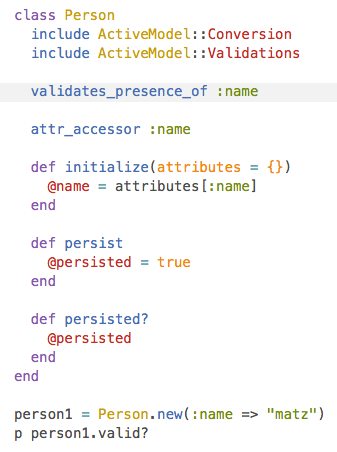
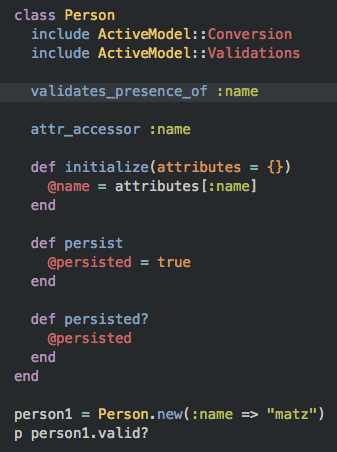
Head over to Tomorrow Theme for more details.
NexT comes with few configurations.
# Menu configuration.
menu:
  home: /
  archives: /archives

# Favicon
favicon: /favicon.ico

# Avatar (put the image into next/source/images/)
# can be any image format supported by web browsers (JPEG,PNG,GIF,SVG,..)
avatar: /default_avatar.png

# Code highlight theme
# available: normal | night | night eighties | night blue | night bright
highlight_theme: normal

# Fancybox for image gallery
fancybox: true

# Specify the date when the site was setup
since: 2013


BrowserStack is a cloud-based cross-browser testing tool that enables developers to test their websites across various browsers on different operating systems and mobile devices, without requiring users to install virtual machines, devices or emulators.
Contribution is welcome, feel free to open an issue and fork. Waiting for your pull request.
e6fbc37c7287f42c059bd220752b9e598a1a626d