
A simple question answer like chatbot to simplify you data input.
to run you need to have enviroment variable as in .env.example, rename it to .env, by default you need to create coral dir or you can specify by env var CORAL_DIR. The coral dir is for the bot configuration, so create a coral directory and put all the coral file in this folder, also you need the WhatsApp session file in order to connect to the current phone
Use this tools to generate the whatsapp session file k1m0ch1/WhatsappLogin, you can download the latest binary file from the latest release
and run with command ./WhatsappLogin -p 08123123123 and scan the QR
or
run with docker
docker run --rm -v sessions:/go/src/github.com/k1m0ch1/WhatsappLogin/sessions k1m0ch1/whatsapplogin:latest -p 08123123123
after you have file 08123123123.gob and coral directory with basic.yml inside, run the NeMo with this command
./NeMo 08123123123
this will find the file 08123123123.gob in the SESSION_DIR environment variable by default this will goes to current directory running file
you must prepare the coral directory include with yaml file and Whatsapp file session, after that mount volume in docker with example command like this
docker run \
--name NeMo -v $(pwd)/coral:/app/coral \
-v $(pwd)/.sessions/08123123123.gob:/app/08123123123.gob \
k1m0ch1/nemo 08123123123
Coral as in the house of the clown fish, is the configuration of the bot in order to specific give the operation to NeMo, you can see the example from the basic.yml or example.yml file
Specifically to define the author of the configuration
author:
  name: name
  phone: "08123123123"
email: email@email.comThis will be triggered when users chat any text to NeMo and start to send message and expected by the variable expected_users
default_greeting:
  message: "to start talk with me type\n\n*!start*"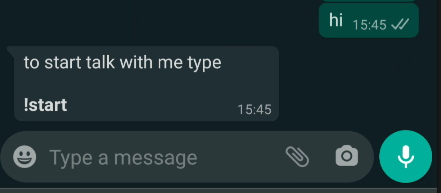
just remember if you want to record or in run process after triggering the commands, but the True value for record and run_process
commands:
  prefix: "!"
  command: "start"
  record: True
  run_process: True
  message: "Let's start how cool you are"
This configuration define the question after commands triggered, for a
in order to use validation rule image, you need to specify AWS S3 configuration in .env file
process:
  timeout: 300
  exit_command:
    prefix: "!"
    command: stop
    message: "alright I'll stop asking"
  end_message: "Hey its done, thank you"
  questions:
    - question:
        slug: first
        asking: please take a pic your beautiful face
        validation:
          rule: image
          message: "must a pic dude!"
    - question:
        slug: second
        asking: tell me some random number
        validation:
          rule: ^[0-9]*$
          message: you can't read that ? I ask you to write some number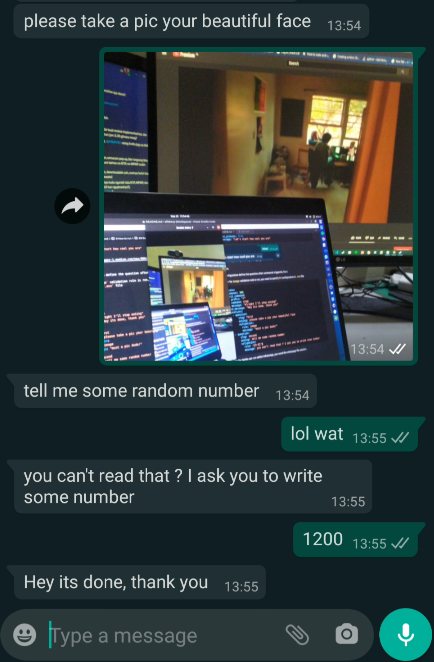
In order to save the input data, you can rely on webhook that built in this ChatBot
webhook:
  service: WEBHOOK
  url: https://url.com/webhook
the data will be sent with POST method to url key with body JSON like this
{
 "phone_number": "628123123123",
 "current_process": "basic",
 "current_question_slug": 1,
 "process_status": "DONE",
 "data": [
  {
   "slug": "first",
   "question": "please take a pic your beautiful face",
   "answer": "https=//public-tools.s3.ap-southeast-1.amazonaws.com/fresh/nemo/645C4CC4141DB97B2A29BBE33725B1BE.jpeg",
   "created": "2020-09-25T13:54:56+07:00"
  },
  {
   "slug": "second",
   "question": "tell me some random number",
   "answer": "1200",
   "created": "2020-09-25T13:55:17+07:00"
  }
 ],
 "sent": "",
 "sent_to": "",
 "created": "2020-09-25T13:54:19+07:00",
 "expired": "2020-09-25T13:59:19+07:00",
 "finished": "2020-09-25T13:55:17+07:00"
}is a list of a phone number that expected by ChatBot, technically a whitelist that chatbot will hear, currenlt I made this for a specific phone number, because I'm not making this for "any" users, currently I want to made that, but I need more validation to implement that
expected_users:
  - 628123123123
  - 628321321312
you can set the expected_users to any so this will targeted the any user for command and default_greeting but the schedules will be disabled due to any users
expected_users:
  - any
in order for NeMo can run within WhatsApp, you need the whatsapp file session
Use this tools to generate the whatsapp session file k1m0ch1/WhatsappLogin
you can download the latest binary file from the latest release
and run with command ./WhatsappLogin -p 08123123123 and scan the QR
or
run with docker
docker run --rm -v sessions:/go/src/github.com/k1m0ch1/WhatsappLogin/sessions k1m0ch1/whatsapplogin:latest -p 08123123123
go run . 08123123123
this will find the file 08123123123.session in the SESSION_DIR environment variable by default this will goes to current directory running file
[] need to validate if the ChatBot already sent the message, so he will not sent a duplicate message
[] weird file session JSON error parsing, weirdly added the "":"} string in the end
[] build for ANY expected users, along with the builder
[] if error logging in, try to re-login
[] YAM file can be .yaml or .yml, currently only yml is validated
[] Multi Schedule is not
[] Multi file yml with some with no greeting or no schedule or no commands
[] must test all the builder work well
[] ~ada orang yang nyangkut gara gara status NEXT nya diem, bisanya nge break pas ada ~
[] semua bentuk dokumen harus di kasih handler
[] ada orang yg kirim gambar langsung tanpa command atau session apapun, langsung ngebreak soalnya dia mencoba coral yg tidak exist
[] kirim gambar langsung modar
[] ga ada sesinya langsung modar, masalah di image handler