Changing disk controller type is not working for root disk or data disk #4344


Description

ISSUE TYPE
- Bug Report
COMPONENT NAME
VMware
CLOUDSTACK VERSION
Cloudstack 4.14.0.0, master
CONFIGURATION
OS / ENVIRONMENT
SUMMARY
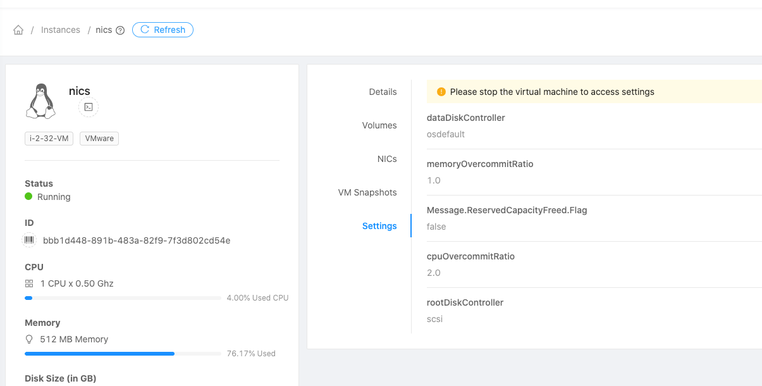
Changed the controller from IDE to SCSI from VM settings tab on stopped VM and then started the VM.
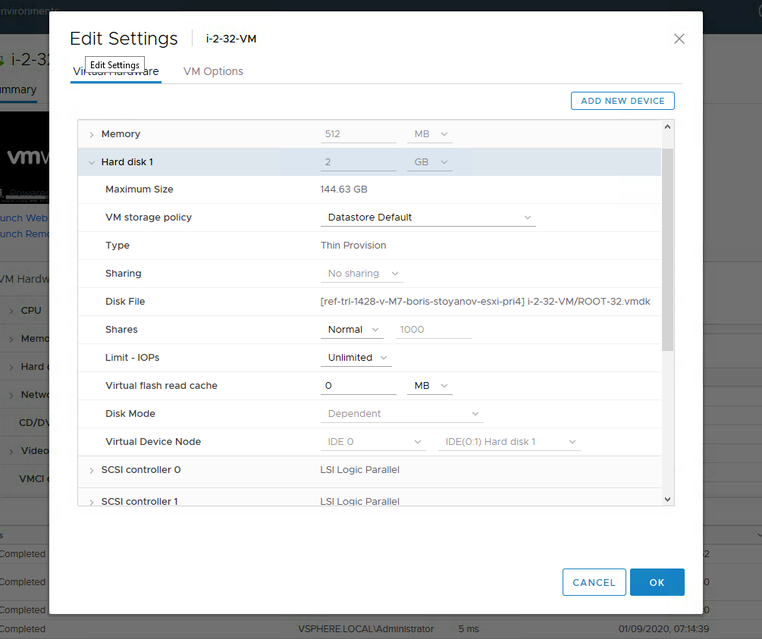
Now cloudstack shows scsi but vmware shows IDE.
CloudStack deliberately fetching the controller details from already existing disks and sets the same irrespective of the VM settings or template settings.
STEPS TO REPRODUCE
- Create VM (on VMware)
- Stop VM
- Go to VM settings
- Change root.disk.controller from IDE to SCSI
- Start the VM
EXPECTED RESULTS
Controller at vCenter should change to SCSI on the corresponding hard disk of VM
ACTUAL RESULTS
Controller at vCenter still shows IDE on the corresponding hard disk of VM